How to Reduce Job Application Form Abandonment
As your business grows, so grows your need for help to keep the quality of your products and services. You want to make sure your clients come back and that they become ambassadors of your brand. And…
As your business grows, so grows your need for help to keep the quality of your products and services. You want to make sure your clients come back and that they become ambassadors of your brand. And the right team is the start to conquer all of this.
But if candidates keep dropping off their job applications, your process to find the perfect team can become harder. So, what you need to do is to improve the hiring process, starting by building the perfect job application form.
In this article you can learn about reasons why candidates abandon job application forms, so you can avoid making the same mistakes, and also how to reduce job application form abandonment. Newsflash - FormBuilder has all the form features to improve submissions and to help you analyze all applicants faster.
Hiring is expensive
The average cost-per-hire is up to $4,000, according to the Society for Human Resource Management. If you’re a small business owner, you may likely not have the luxury of a dedicated HR department or staff. In that case, you’re looking at an even heftier price tag if you outsource your hiring (anywhere from a 15-25% finders fee).
One quick (and cheaper) solution is to make it with an effective and easy-to-fill-out job application form.
Aside from the cost of hiring, what doesn’t change according to the organization size is the need for an effective online job application form. You need to keep it brief and streamlined. The job application form is the starting point of the hiring process.
What is job application form abandonment?
Every time a visitor starts to fill out a form on your website but doesn’t submit it, it is a form abandonment.
As a business person, you’re familiar with the burden of an abandoned cart and lead capture form. Unfortunately, there is no magical way to convince every visitor to close the deal or to sign up for your newsletter. But there are several ways to minimize the loss.
And when the subject is the job application form you can be assured that the right form elements and best practices can secure your business with the most fitting candidates, reducing the abandonment rate.
How to track your forms and keep candidates moving
Tracking forms is a simple action. FormBuilder's form analytics show you how many people viewed the application, how many started it, and how many submitted, so you can see how big the drop-off is and whether a change to the form helps.
If the gap is large, put the email address on the first page and move the optional questions to a later page. And once an application is in, turn on an automatic confirmation email with your own subject and message so the candidate gets a reply right away. Remember to be convincing so your message catches the candidate’s attention. Talk about your company and show all the reasons why it would be great to work with you.
3 Reasons why Job Applicants abandon the Application Form
Everyone that has been part of the “finding a job” race ends up with a crucial dilemma once in a while about whether to continue with a process or not. Once I did abandon a hiring process because I was on it for two months and the company wasn’t open about how they were evaluating us (the candidates). Well, since I know you want to avoid losing good candidates, here are some reasons why people abandon your application form so you can avoid doing any of it when hiring.
Too long or complicated processes
You don’t have to ask the candidates to do impossible or time consuming things, like finding the needle on the haystack or sending ALL their information at once.
You want someone that is good at their job, hardworking, and that believes in what they are doing, which are characteristics that can guarantee the best results and, more importantly, such a candidate will help you grow your business once hired.
So, instead of conducting a long and complicated hiring process, and asking tons of questions on your form, you can use smarter methods. Explore your creativity and let your company’s identity be part of your hiring process.
You can create job application forms as quizzes to learn more about the candidates and also explain to them how your business structure is. Or, you can have a simple job application form where you ask for candidate’s key information (name, degrees, work experience, email address, etc.) and allow them to attach their Resumé.
Hiring process is not mobile-friendly
A little fact for you to think about: 45% of job seekers use their mobiles to search for jobs daily. Our mobile devices are a big part of us. We spend hours using them. And it is only logical that candidates would use them to seek companies, job opportunities, and even to apply for a new position.
So, mobile-friendly forms are mandatory when you’re looking for the perfect candidate.
But don’t worry, FormBuilder gets you covered. Our forms are responsive by default.
Companies take too long to respond to job seekers
Imagine a big “just don’t do it” sign. Well, this is the topic where you should consider apply such a sign since there is nothing worse than never getting a response to your inquiries. The candidate dedicated time to fill out your form and they deserve to hear from you.
With FormBuilder you can send automatic messages thanking the candidate and inviting them to learn more about your company. If possible, you can tell them how long it can take for you to contact them with the result and feedback. See, it's not that hard to be nice to applicants.
Pro tips to reduce job application form abandonment
Under the pressure of pursuing the best candidate for your business? Imagine finding a solution for it. It may be like a cold glass of water on a summer day, am I right? And here we are to help you find your next “employee of the month”.
Reducing job application form abandonment can be simpler than you think. These are a few pro tips to make sure your job application form stands out and convince the candidate to submit the form.
Allow the candidate to set their pace
Tell candidates up front what they will need (resume, references, start date) and how long the form takes, so they can pick the best time and device to fill it out.
FormBuilder also saves answers as candidates type. If they close the form and come back later, they pick up where they left off, so they can decide when it is the best time to finish and submit.
Keep document uploads optional where you can, and ask for a link to a profile instead of a full work history when a resume is attached. Letting the candidate apply without hunting for paperwork mid-form is a great technique to avoid form abandonment.
Create an outstanding Design
A great job application form is the one that highlights your brand marks. Use your business colors, fonts, background image, and any other detail that matches your business identity.
But remember to be careful and set a balance with your form’s design. Too much can make your application form confusing.
Define everything about your form to make it less overwhelming and help candidates through it.
Keep a consistent structure
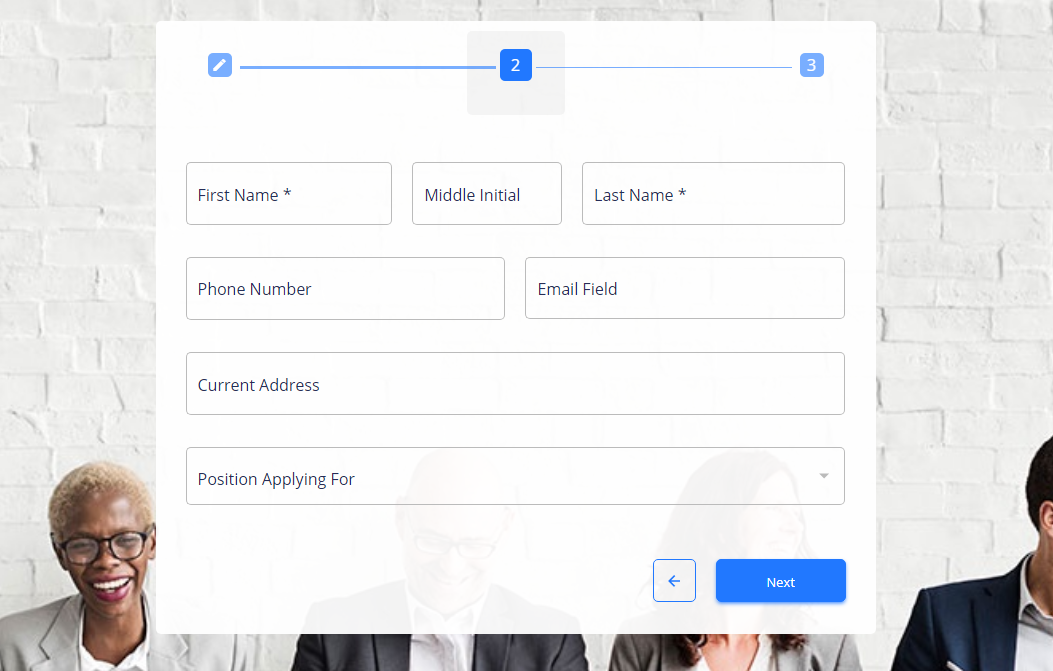
Beginning, middle, and end. Like in an essay. Make sure your form links a question to the following one. If it helps, you can separate by personal information, education, work experience, and so on. You can add a divider to create a better visual, or build a multi-step form.
by FormBuilder
Multi-step job application form template
And, if you’re getting the candidate’s resumé as an attached file, you may prefer to use more creative questions to learn about the candidate’s skills that are not usually mentioned on a CV.
- Reasons why they left a previous employer
- Immediate supervisor information (names, contact information)
- Available start date
- Applicant signature
Learn more about how you can build a job application form that gets you all the best matching candidates.
Be sympathetic to job seeker’s time
Consider your own job-seeking experience. How many times did you feel you were copy and pasting or refilling the same information unnecessarily? How long did it take you to fill out a job application before you bailed?
“It’s a job application, not an interrogation.” - Carmen Bryant, Indeed.com
While adding required fields helps you filter out applications that are not qualified, industry research shows that keeping the job application process under 5 minutes is the best call.
Start with a simple, clean, easy-to-read design. FormBuilder has various form templates available for your customization.
Stop losing good candidates over bad hiring processes. Smart application forms by FormBuilder are the solution you’ve been looking for.