Best Contact Form Builder for 2026
The best way to receive messages from your website’s visitors is with a contact form. And whether you coded your whole website yourself or used a platform.

The best way to receive messages from your website’s visitors is with a contact form. And whether you coded your whole website yourself or used a platform like WordPress or Wix, you can get a lot more functionality with a contact form builder.
Especially when you consider the costs of coding the form from scratch, the best contact form builder will save you time and money. So if you need specific features, there are alternatives to the most commonly known contact form builders.
Creating contact forms with FormBuilder

FormBuilder is our pick for the best contact form builder. It stands out because it combines a drag-and-drop builder with an AI form generator, form analytics and payment fields, without the pricing complexity of the bigger builders.
It’s a hosted application, so there’s nothing to install. You build the form in FormBuilder, then embed it on WordPress, Wix, Shopify, Squarespace, Webflow or a plain HTML page with a simple copy and paste, or share it as a link.
The reason we call it the best contact form builder is simply because it makes it easy, quick and intuitive to create a contact form for your website that is optimized for conversions,lead capturing and workflow automation. Let’s start with what makes a good contact form.
Contact Form best practices
The ‘Contact Us’ page of any website is typically one of the most visited, especially for businesses. This is why it’s so important to get it right, to increase conversions and create brand trust.
A good contact page is clear and straight to the point, the user needs to know why someone would contact your business and the kinds of solutions you can bring them.
A contact form is a great way that simplifies the process, but be careful not to overwhelm the visitor by asking them several questions in this first form.
The idea is to first get the bare minimum that you need to understand what they need from you and so you can reach out to them with your reply.
Optimize the contact form conversion
Your first priority when creating a contact form is making sure that it is appealing to your visitor and easy to find.
There are a lot of different design choices and placements you can test to see what brings better conversion rates for your form.

Here are some key elements to look into when designing an optimized contact form:
Form Design
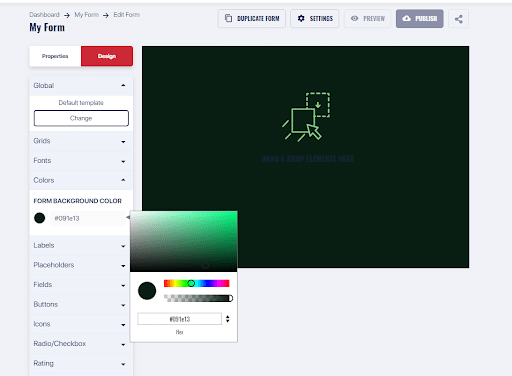
Your form’s design needs to reflect your brand. A lot of times, you’ll come across websites with very creative and beautifully designed webpages, but the contact form looks like the standard template you’d find back in 1993.
Everything is design. Make it into a style that reflects your brand, use the same color palette and make it fit well within your webpage. It’s absolutely imperative that your form is responsive and is easy to read and fill out on any device.
Number of form fields
If someone wants to contact your business, it’s your job to make that as easy as possible. This means that a contact form with an almost endless list of questions that will take them more than 5 minutes to answer, is not advisable.
Remember that a contact form is meant to start a conversation, you find out what they want to tell you and you ask for the minimum amount of information to keep the conversation going.
A contact form is meant to start a conversation. Keep it quick and simple.
Field justification
“Why? Why? Why do you need all of this information? What are you going to use it for?”, is what could potentially go through your visitor’s mind when your form has fields that aren’t relevant.
Especially for this first interaction through a contact form, users aren’t expecting to have to answer a lot of questions.
So if there is some specific information that you need from them that isn’t commonly asked (such as name, email, and message), consider adding a toggle telling them why you need that info.
Or simply eliminate that field from your form, asking for that information later in the sales funnel or in a survey.
User effort level
This has to do with making your form quick to fill out. Online forms don’t have the luxury of having the person’s sole attention as do paper forms. It can be very easy for them to leave your contact page and abandon your form.
A few tips to reduce the users’ effort level, other than reducing the length of the form, is to optimize the type of field you use. Take advantage of dropdown or single-choice fields, that the user can answer your question with a quick click.
Make your contact form quick and easy to fill out.
Call to action
Users need to have a clear objective when they interact with your contact form. They need to know why someone would contact you, is it to make an order, file a complaint, give feedback or just say hello (it could happen)? You can help them make that distinction with a dropdown field with a list of options.
Finally, make that Submit button as clickable as possible. Not only in its color and shape, which, ideally is similar to the design of the other buttons on your website. But also in its message, choose something like ‘Send Message’ or ‘Send me a Quote’ or even ‘Submit Feedback’. Essentially, you want words that are specific to that form’s goal and make them feel that their message will be heard.
Why FormBuilder is the best contact form builder
Yes, this may seem like we’re tootin’ our own horn, but hear us out. There are at least five elements that make an online form builder great: user-friendliness, automation options, security, integrations, and pricing. FormBuilder was built with all five in mind.
User-friendliness
Once you’ve set up your account with FormBuilder, the builder is incredibly easy to use. It has a clean and intuitive design so you know where to look depending on what you want to do, and a great selection of free contact form templates you can customize.
If you’d rather not start from a template, describe the form you need and the AI form generator will draft it for you. You can also import an existing form from a PDF, a URL, Jotform or Typeform.
Plus it has a help center if you ever have any questions at all. Fields are purpose-built: drag in a name, email, phone, dropdown or long-text field and set it as required with a click.
Form Automation
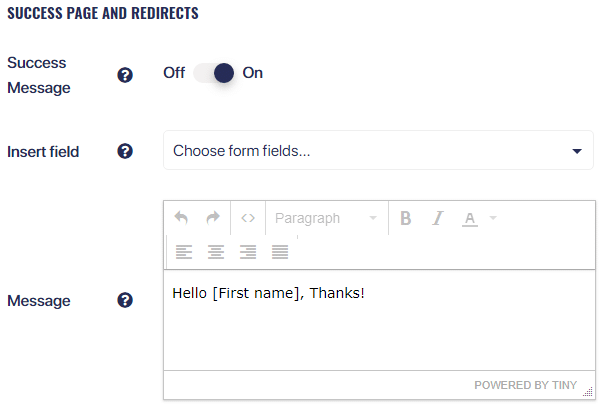
Even with FormBuilder free plan you can redirect the user to another page, add a success pop-up message, or create an automatic email notification to be sent out once the form is submitted. These notifications can be customized with information submitted with the form.
You can also show or hide fields with conditional logic, split longer forms into pages, and schedule when a form opens and closes.
Form data security
Your data and your submissions’ data are safe with FormBuilder. Forms are served over SSL, submissions are stored encrypted, and access is limited to the people you invite to your team. FormBuilder includes GDPR tooling, spam protection, and a HIPAA plan for organisations that need a signed BAA. See our HIPAA, GDPR and compliance guide.
Form Integrations
Integrating your form with other productivity tools is an excellent strategy to speed up your work. FormBuilder has a native Google Sheets integration that sends every submission straight into a spreadsheet, plus webhooks for developers. Through Zapier you can connect to 6,000+ apps, including Mailchimp, HubSpot, Slack, Salesforce, Google Drive and Dropbox.

Pricing
You get a lot for your buck with FormBuilder’s pricing plans. The free plan includes 5 active forms and 100 responses per month, with no credit card required, which is enough for a contact form and a few extra forms on most small business websites.
Pro is $39 per month with a 14-day free trial, and covers 100 active forms and 10,000 responses per month. It also removes the FormBuilder badge and adds custom branding and custom domains. Prices checked September 2026.
Are you ready to start? Check out some free form templates you can use for your website and start building.