How to Build a Contact Form in BigCommerce
Reduce your workload, improve your business, and save time and money using a high-performance contact form with BigCommerce. A well-built form can be game-changing for your business growth. Let the…
BigCommerce is a growing platform for e-commerces. You can have your business there, and set up forms to sell your products, and get in touch with your audience. Let the user send messages to your business, and leave this form on autopilot, bringing leads and data to your business.
Reduce your workload, improve your business, and save time and money using a high-performance contact form with BigCommerce.
A well-built form can be game-changing for your business growth. Let the visitors know you are open to establishing a conversation with them. This improves your user experience and solidifies your business as a respectful and trustworthy one.

In this article, you can learn more about BigCommerce, e-commerce in general, and also how to build and embed a powerful contact form to your page.
What is BigCommerce and what having an e-commerce means
BigCommerce is a platform for e-commerces. You can open your e-store easily using BigCommerce. They have as their mission the responsibility of helping business owners to sell more and maintain sustainable growth.
The company was founded in 2009 and since then they had a growth in size and trust from their consumers. BigCommerce powers tens of thousands of online stores around the globe, which means they have a great part in the e-commerce impact worldwide. Most of these companies are in the retail industry.
The company’s objective is to help e-commerces grow. And all you have to do is trust this goal and improve your product, conquering and converting more leads. And web forms are a great ally on this path.
What is e-commerce
When you sell and buy goods or services online you’re being part of the e-commerce system. Even if you have a physical business, when you make deals online, you’re establishing e-commerce.

As an online business, you must enable several features in order to be functional. The obvious one is having a website or any other kind of platform where you can sell your goods or services.
We’ve learned that almost everything can be sold and bought online. The pandemic was the starting point of a new way to do shopping, and online buying has kept growing since. That makes now a great time to start your own business.
Why e-commerce matters more today
Believe it or not, you may not be the first generation doing online shopping. E-commerce was invented 40 years ago by the English inventor and entrepreneur Michael Aldrich. Although, it only became economically viable after the internet got available for the majority.
In the beginning, the sales were made through telephone, and they could be to the final consumers or business to business. Only in 1994, the first purchase was made online. Dan Khon sold, in August of 1994, at the website he created, the NetMarket, a CD of Sting's "Ten Summoner's Tales", to a friend.
Well, maybe e-commerce is not as new as we believe, but fast growth is. During the pandemic, consumers from the entire world started to rely more on the internet for their shopping, both for goods and services, and the habit stuck.
You can open your bank account without ever stepping foot on a bank; work and get paid without ever meeting your client; buy your food and have a happy meal, without leaving your home, wearing your pajamas. This is how simple, and less personal, daily life has become for a lot of people around the globe.
And it all started with an idea from 1979.
Advantages of having an e-commerce
With an online business, you have the chance to reach out to a larger public, deliver services faster, and save money by reducing operational costs. These advantages have a large impact on any business and can help with growth since you’re saving time and money, which means you can improve your quality and offer a better customer experience. Let’s explore each of these advantages in depth.
1. The processes are faster
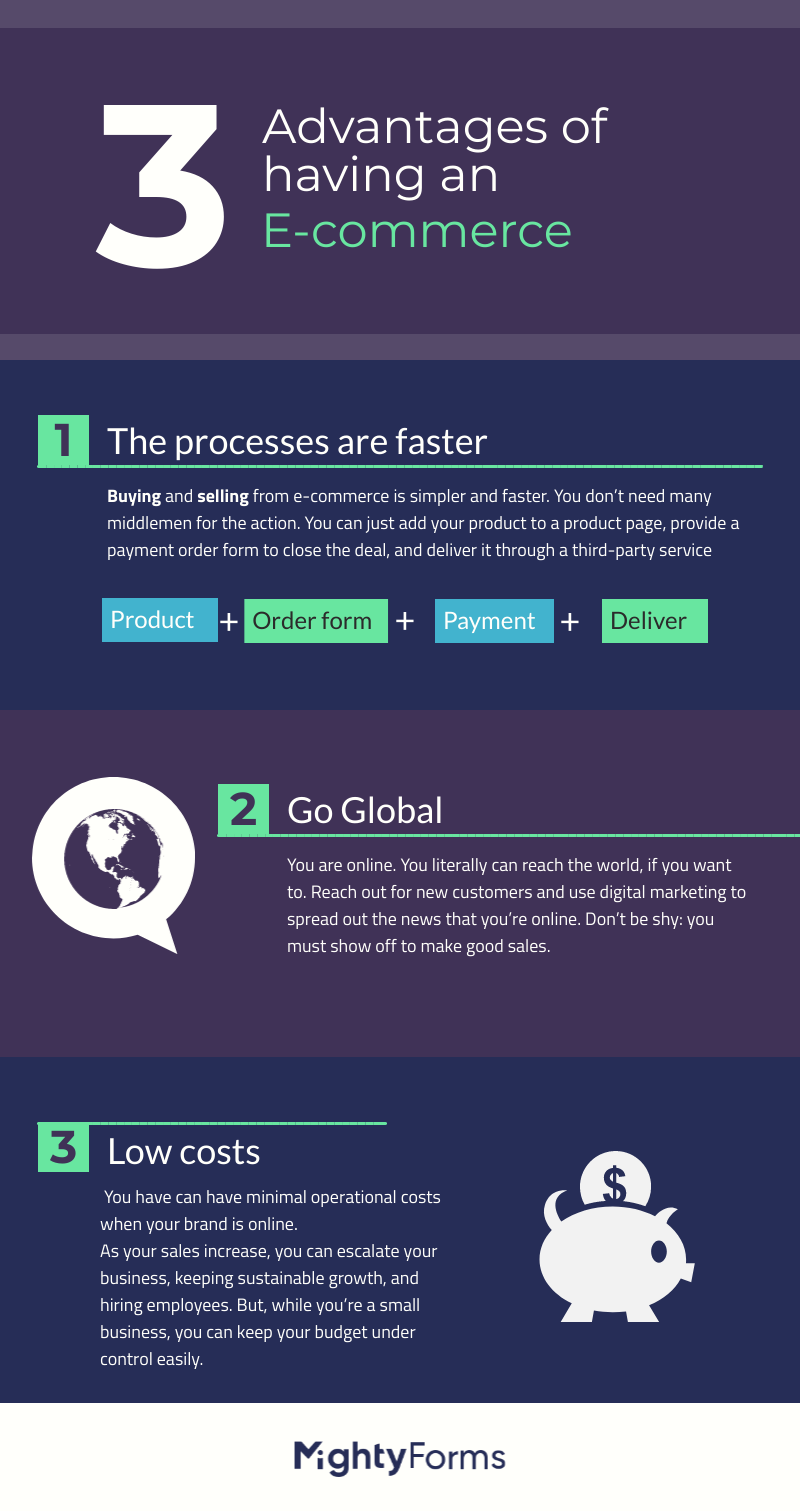
Buying from e-commerce is faster than when you buy from a physical store. Besides, you can buy at any moment, from any place. I mean, you can decide you need something new while you are in bed preparing to sleep. Not that it’s a good, or healthy, idea, though. But you can.
Also, selling from e-commerce is simpler and faster. You don’t need many middlemen for the action. You can just add your product to a product page, provide an order form to close the deal, and deliver it through a third-party service.
2. You don’t have to settle for local commerce
You are online. You literally can reach the world, if you want to. Look at major companies. They are global. Maybe it is too soon to talk about having a multinational operation, but the point is: you don’t have to settle for your local community to sell your goods.
Reach out for new customers, that can be next door, or in another state. Use digital marketing to spread out the news that you’re online. Digital media is your ally. Email marketing to your best friend. Don’t be shy: you must show off to make good sales.
3. Low costs
How many employees do you need? Fewer than having physical commerce. And what about the location rent? No, you don’t need that. You can work from your living room with e-commerce, if you need to, of course. You have minimal operational costs when your brand is online.
As your sales increase, you can escalate your business, keeping sustainable growth, and hiring employees. But, while you’re a small business, you can keep your budget under control easily.
Creating a contact form on BigCommerce
You need powerful and automated forms for your e-commerce by BigCommerce. The form can work to bring closer interaction between the user and the business, leaving more time for you to focus on selling and promoting your wonderful products.
You can automate the user experience when you use an optimized and well-built form. When you set up functionalities and features, using integrations, the visitor has a better interface to use, and you have more time to explore their needs and behavior.
On BigCommerce you can build forms without having to connect to any third-party service, but they will be simple and non-customizable. If you want a personalized form, you can count on specialists like FormBuilder, and embed the form on any BigCommerce page.
And you need beautiful and branded forms to call the user’s attention and convert them. And these forms are better performed when automated.
Automation form software for BigCommerce
Focus on selling your products with form automation software. You can leave your forms on autopilot, having time to dedicate to other, more demanding, tasks, such as creating content that converts or improving your products, or services.
Form Automation Software is the quickest way to set up forms that work for you, doing the heavy lifting, letting you just do the simple tasks. An automation software, by principle, must take time-consuming tasks and perform them in an optimized and fast manner.
By using form automation software you shouldn’t worry about the forms functionalities once it’s published. Your only worry must concern its performance and study the reports, to adapt the form to the audience.
How to build, embed, and leave on autopilot a contact form on BigCommerce
BigCommerce is a great platform if you’re e-commerce. And FormBuilder is a form builder built around automation: notifications, integrations and conditional logic that run without you. The combination of both services can only mean something good. And the solution we bring to you is one that allows you to connect to your leads, convert them, and automate boring, time-consuming tasks.
And to do all of this is easy-peasy. In a blink of an eye, you can have your contact form working for you, saving time and money to your e-commerce.
Why you must have a contact form on your BigCommerce
Contact forms are the gateway that gives business access to the leads. They can easily contact e-commerce about any subject, from feedback to requests. Having an open channel of communication is a great step to conquer a good user experience and also increasing the lead’s trust in your business by providing the opportunity to reach you
To offer a good user experience and to receive notes and messages from consumers, which allows you to improve and grow your business, are some of many reasons to have a contact form on your BigCommerce page. Another reason includes building up a mailing list for newsletters, promotional emails, surveys, and any other possibility to get in touch with the consumer and get to know them better, for a closer relationship.
But not only add any contact form. It has to be optimized, responsive from any device, and automated, which means more time for you and your team. Also, a good contact form is the one that displays business patterns, like the color scheme, typography, and, most importantly, the company logo.
Learn how to build a contact form that helps you gather more leads, and reduces your task piles.
1. Building a contact form
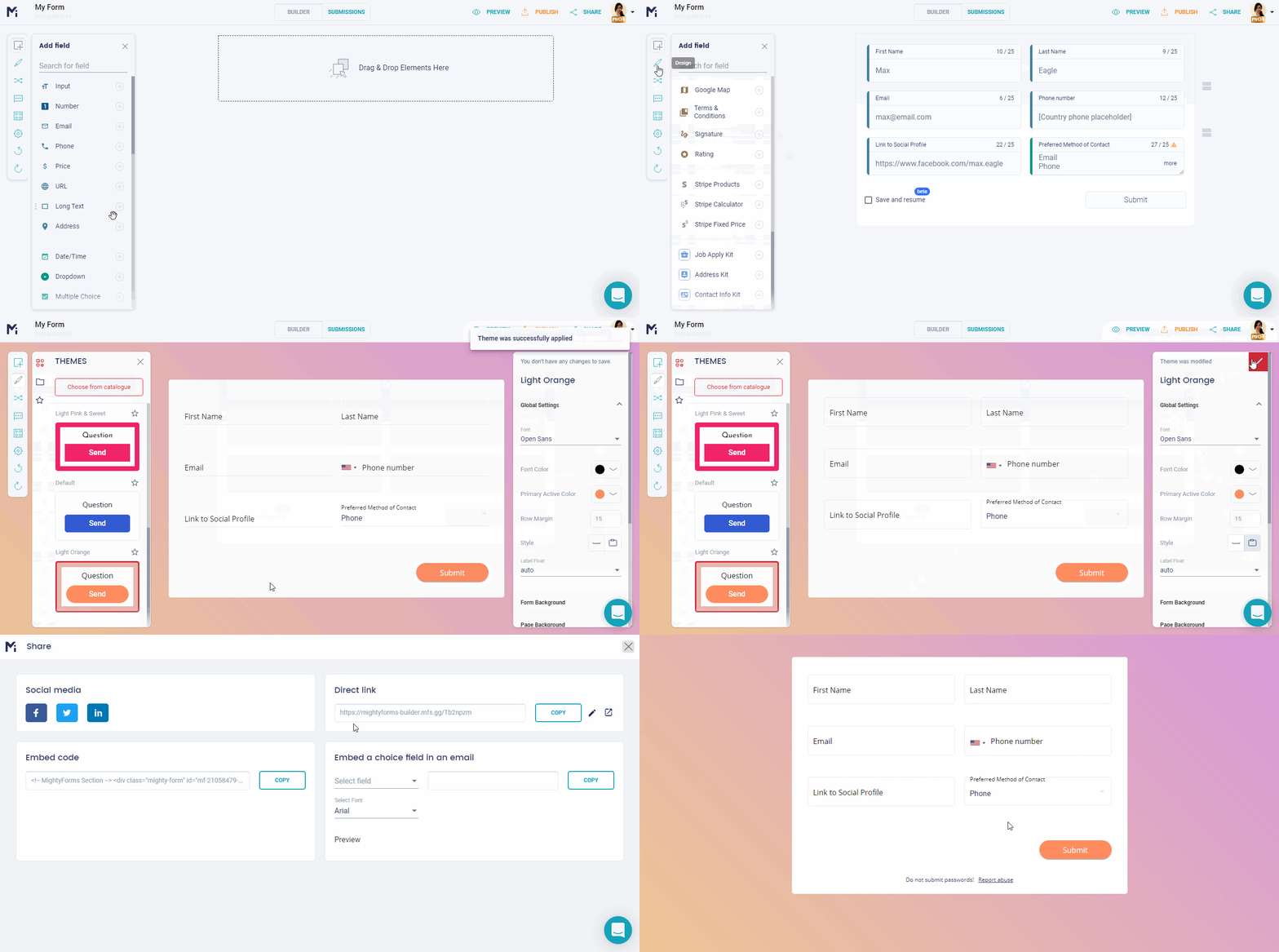
To build a contact form using the FormBuilder app is easy and a very intuitive process. The first action is to sign in to your FormBuilder dashboard. But, if you don’t have an account yet, don’t worry, to create one is very quick and free. The free plan includes 5 active forms and 100 responses per month, with no credit card required.
Now that you logged on to your account and are at the dashboard, you can either start building from one of our multiple options of contact forms templates, start from scratch, or describe the form to the AI form generator. Add all the fields that you need, remember to keep it simple and straight to the point. People won’t fill out a form that asks too much and without a reason for it. An example is a phone number - only ask for it if you really need it and explain why you need it.
Then you will change the design of your form, giving it the business personality. To finalize, you will add the company logo.
Now, all that is left is to add the integrations and features you can enable to automate the form and embed it to your BigCommerce site.
2. Leaving the form on autopilot
You can use features and integrations that automate your contact form, reducing the time you spend on ordinary, time-consuming, simple tasks. Eliminating those and letting the software perform, can leave you with more time to dedicate to conquering leads, delight them, and also, improve your business and its product.
To do so you must first determine what are your goals and set objectives for the form. After that, you can see clearly what are our needs and all the features that can help you fulfill them.
Examples of features and integrations available and how to use them:
Dropbox and Google Drive are two cloud services you can connect to your contact form through Zapier, so uploaded files land in your cloud storage automatically. By doing so, you won’t have to worry about how to find uploaded files or about storage space on your business computer.
Zapier lets you integrate with thousands of other services and apps, streamlining your workflow and improving the form performance. Google Sheets is a native integration, so every submission can land in a spreadsheet as it arrives.
Form Analytics, one of the most useful features you will find. With this, you can track each form’s views, starts and completions and realize what is working or not on the form.
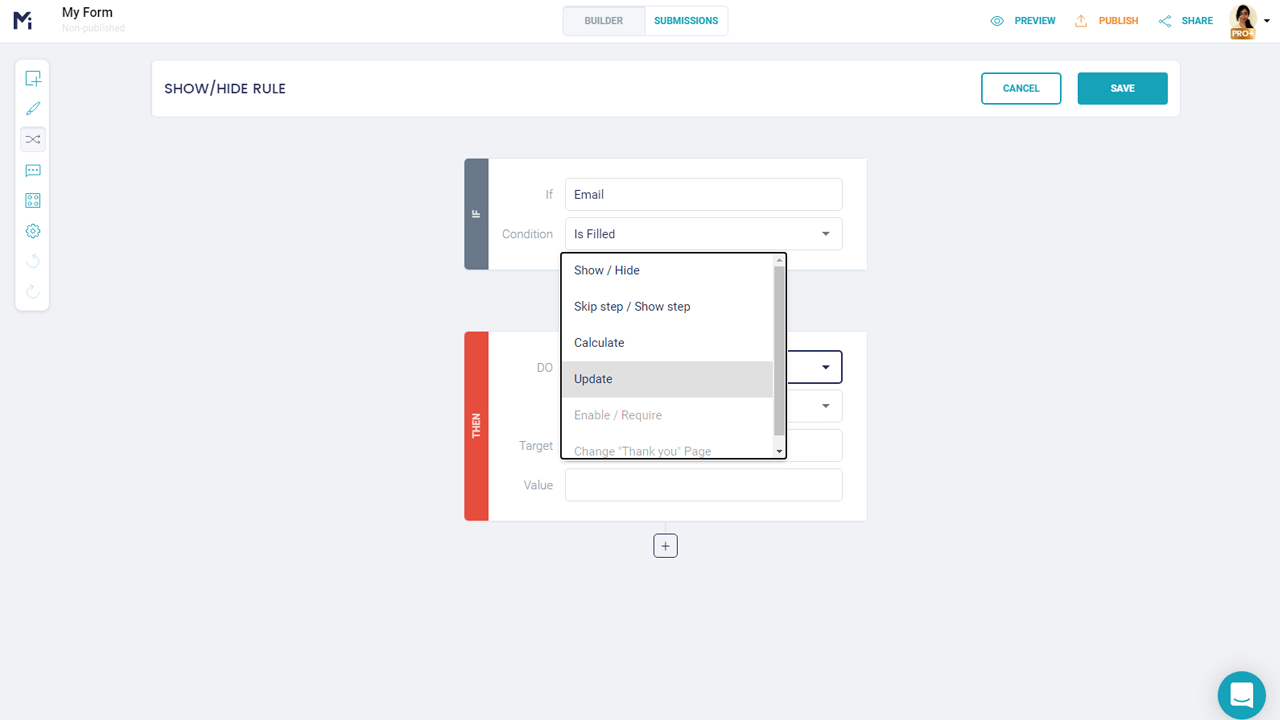
Conditional Logic, also called logic jumps or logic rules, among other terms. You can use conditional logic for several objectives, such as guiding the respondent through the form by showing or hiding fields according to previous answers. Pair it with a calculation field to total up the products picked on an order form.
Multi-page forms, although not exactly a functionality for automation, can help you gather more leads. Splitting a longer form into short steps makes it feel lighter, and because answers save as people type, a lead who has to leave can come back later and pick up where they left off, increasing your chances to delight and convert a new lead.
Email notifications are one of the most important form functionalities available. That’s because you must know, and also warn the team, every time a new submission happens. With this head-up, the team can start on a campaign to delight and get to know the interests and behavior of the new lead.
3. Embedding Contact form to your BigCommerce page
After building and adding everything that makes your forms great, it is time to add them to your BigCommerce page and let them do the hard work for you. FormBuilder forms embed on any BigCommerce page with a short code snippet, so your forms will perform perfectly with full compatibility. No app installation is needed.
You can send the embed code to a developer, or you can do it yourself. In the BigCommerce control panel, open the page (or a Banner or HTML widget in Page Builder), switch to the HTML view, and paste the snippet where you want the form to appear.
Now you have your beautiful, responsive, automated contact form on your page. Work on your product and let your e-commerce grow, building a good customer experience.
Advantages of using form automation software
There are two main advantages when you use form automation software - saving money and time. We talk a lot about form automation software in another article, check it out to know more about the subject. Here we will only present a few advantages, besides these two already mentioned.
Save money
This is one of the top reasons for you to start using form automation software. After all, you can cut out unnecessary costs and allocate the budget to precise tasks, organizing with this action your business money.
Save time
for both you and the team. All because time-consuming tasks can now be done automatically through integrations and features.
Get to know how a form is performing
Plus do all the adjustments to convert more leads. Automation lets you see the details about your forms. Use form analytics to get to know your contact form better, since it provides views, starts and completions, letting you know how many leads drop off, so you can know your audience and work on a better campaign to delight the leads.
FormBuilder and BigCommerce
Now you know that you can easily add contact forms on your BigCommerce page, powered by FormBuilder, use the same method to build and embed other kinds of forms to your page.
Start using FormBuilder to build powerful, responsive, and time-saving forms. Get more customers starting now.