How to get Donations with an Online Form
Nonprofits and businesses running a charitable campaign can all benefit from a well-designed Donation Form. Learn what is a donation form and how to build and design a donation form. It's all here in…

Donations forms are the easiest and quickest way for fundraising. Donors who give through a charity-branded donation page give 38% more over time than donors who give through a generic page, according to Network for Good’s Online Giving Study. A simple link to a payment company, such as PayPal, does not carry your brand. There’s a lot you can do with a donation form.
Let’s say you are part of a non-profit or a charity organization, part of your job is raising funds. How do you do it? Go door-to-door asking for donations? Although door-to-door may give you some results, it’s not as efficient as you imagine. It is a direct approach that convinces few people, but not enough to reach the amount your nonprofit needs to properly perform.
Doing events can be a more creative way to deal with fundraising. And here comes a “but”. Events are expensive to run, reach only the people who can show up, and happen a few times a year at most.
Then, what is the solution?
You can build a donation form for your organization. People are on the web, so should your non-profit. Create a website, talk about the organization, and answer questions. What do you guys do? What are your projects? Show your work.
Then you can add a beautiful donation form that convinces people to donate for your non-profit. On a web basis, you can reach a larger group, that goes beyond your neighborhood and region. Your nonprofit is in the eyes of the World.
Follow our tips and build a form that can capture more donors and more donations to your organization.
What is a Donation Form?
The most important element of a donation page is the donation form. Through the form, you can get donors’ information and receive donations.
Having the proper form can give an excellent experience for the donor. That will happily come back.
Your donation form is the main contact the donor has to the organization. For this reason, it has to be informational, yet simple. Also, it has to be user-friendly, giving a closer relationship with the institution.
Donation forms are of great importance for any non-profit foundation or charitable campaign. They work to build trust, give and gather information, besides receiving donations. Therefore, stop ignoring it and add one to your donation page.
Why does your nonprofit need a donation request form?
Donation request forms are the easiest and most affordable way to receive donations. Using a form you can organize all the donations and give a receipt to the donor.
One more reason is that events and mail campaigns only reach donors at a fixed moment. A form on your website accepts donations at any hour, from anywhere. Going online is an easier and quicker way to raise money for the foundation you are administering.
Online you can reach a larger group of people willing to contribute to your cause. An online form can only help you with the task of gathering more donations.
You can, on the form, talk about the project, give options for donation amount, inform how to donate, and send the donor a confirmation email with a copy of their answers.
As an example of an institution that uses forms, look at the International Center for Journalists. ICFJ uses a donation form embedded on its own page, wrapped in the non-profit’s branding, with one clear way to accept the donation. Use it as inspiration to create your institution’s form.
Donation Forms vs. Fundraising Platform
If you search online you will see that there are a lot of low-cost platforms for your fundraising. Platforms such as Indiegogo and GoFundMe can create campaigns for your nonprofit organization. But, they can have fees (some of them are free) and they are not on your own website. Also, it is about campaigns, not always a recurring fundraiser.
A form can be embedded on your page so you don’t have to create a campaign, your form is always available for donations. Besides, you have the possibility, using FormBuilder, to build it for free and embed it on your website.
Then, you can see the main reason you are needing fundraising. If it is for a single campaign, so is possible that use a fundraising platform can be interesting for you. On the other hand, if you have a website and your nonprofit accepts donations at any time, then a donation form is the best solution for you.
Steps to Build a Donation Request Form
Your form must be clear and fillable. Keep it simple, but, at the same time, it must contain all the necessary information to complete the donation.
We have five tips for your non-profit starting using donation forms and conquering more donors.
1. Use Integrations
You can automate your workflow using integrations FormBuilder offers for you. Several tools can make your job easier and streamline your fundraising. Here are a few integrations that will help you get more donors:
- Google Sheets
Have your form submissions sent automatically to Google Sheets with the native integration. This helps you to organize any data you receive with the submitted forms, keep track of the donations and reconcile the money coming in.
- Cloud storage, CRMs and email tools
Through Zapier you can connect your FormBuilder forms to Google Drive, Dropbox, Mailchimp, HubSpot and more than a hundred other apps. When you do it you can have every submission land in the tool your team already uses.
- Stripe for donations and an email confirmation as a receipt
Receive any donation using your donation request form. With the Stripe payment field, you have the option to let the donor give straight on the form, and the money goes to your own Stripe account. This speeds up the process and makes your life easier. After that, turn on the respondent copy in email notifications so the donor gets a confirmation with everything they entered. Stripe also emails its own payment receipt if you enable it in your Stripe settings.
2. Choose the proper fields
Adding the right fields to your form can prevent abandonment or lower its rate. You can gather any essential information you need using the proper fields. In a donation form you need these fields:
- Name
- Phone number
- Terms and conditions
- Donation method
Tipping request
Any service you use for fundraising is going to have mandatory fees. You can ask the donor tipping to cover those fees. And you don’t have to worry about asking for too much. CauseVox reports that 85% of its donors opt in to cover the fees when given the option. This means that if you include a field for tipping you have great chances to have your transaction costs paid by the donor.
Recurring donor
Ask if each respondent of the form is a recurring donor. For those who check the box, you can then use conditional logic to establish specific next steps on the form. You can, as an example, use a different suggestions amount for recurring donors.

3. Set up a Success message
If you want to conquer recurring donors there is a technique that can help you on the task. Set submission success messages This can give your organization more credibility and generate brand trust.
Imagine a situation when you donate to some institution. But by the ending, you don’t receive any notification. Not only you don’t have an appreciation. but also you don’t know if the donation was made or what are the next steps.
That sounds frustrating, right?
So, don’t repeat this bad practice.
Follow these tips to set to the donation form a success message:
- Make It Personal. Use the donor’s first name on the message. It makes the message personal and gives more credibility to it.
- Say “Thank You”. Add a thank you note to the success message. It is important to show your appreciation after a donation.
- Confirm The Donation. Say that everything is ok with the donation. Confirm you received it. Don’t forget to send a real receipt. This is only to confirm that the donation process is complete.
- Give Donor Something Back. It can be an invitation for a play you are organizing, an e-book you are putting together, or even the invitation for a gathering you are hosting. Offer gifts according to the amount donated. Incentive recurring donations doing so.
4. Write a strong CTA
"Calls To Action" are those words that can make your fundraising grow. Which means, you must do it right. Here are our 3 tips to get the CTA right:
a. Placement
The first thing to pay close attention to is where you are going to place your CTA. It is dangerous to place it on the top before the visitor gets familiar with the cause. But it’s equally dangerous to set it in the end. That’s why you must test where and when to place the CTA.
A great way to test small adjustments is with A/B tests using Google Tag Manager.
b. Wording
Pay attention to is the words you choose. Always use strong verbs that give commands, like “donate now” or “make a contribution”.
c. Make the Value clear
Our last tip is to use the word “free” as much as possible. People get interested when they can win something. Besides, this is Nicholas Kusmich’s golden rule- give before asking. And don't just give anything. If you're asking for value, you must offer value.
Be very clear on how and why the donations are important for the cause you are working on.
Offer something related to what your institution does. For example, the Apollo Theater Foundation offers a package of benefits according to how you decide to contribute to the foundation.
What can you offer?
- Case Studies
- Webinars
- Invitations
- E-books
- Dinner parties
5. Donation Form as Landing Page
Multiple landing pages increase your SEO efforts. According to HubSpot, companies see a 55% increase in leads when they go from 10 landing pages to 15. So, why not have your forms as a landing page? With more leads, you have a greater chance to raise the number of donors to your nonprofit.
Building your form as a landing page you can make it a beautiful page, using your branding. You can then add information about what the institution stands for and give more details about the projects you administrate.
Follow these tips to build a donation form as a landing page:
- Keep it simple. Simplicity is the word of order when building a form. You don’t want to lose donors for building a complicated form. The form must be clear and easy to respond to. Keep the donation form minimalist, accessible, and straight to the point. Ask only the necessary questions, using concise text. A direct approach is the best way to conduct your donation form. And, never forget, make your donation form accessible for any type of device.
- Use your brand and logo on the donation form. You are building a landing page. Your branding, something that represents the non-profit organization must appear on the page. Especially the organization logo. Make sure to the donor that they are on the right page. Ensure that this is your donation form and that they can do their offer. Use colors, typography, and images. You can add an element that resembles your organization branding. Just remember that too much is not ok. Use branding, but keep it simple.
- Offer as much value as possible. Give the donor all the possible choices when it comes to transferring their donation. And make it with a minimum amount, let's say $5, and go on with upper numbers. But stop in a reasonable amount. One last thing that is nice to do is put next to each value what the organization can do with that much money, showing to the donor what they are contributing for.
- Add terms and policies. Add the terms and policies to create brand trust. Donors feel more confident in donating to institutions with disclaimers and policies. Inform about tax-deductions or any other tax implications. This is a document. Therefore, be clear of any legal aspect that concerns the donation.
Free Charitable Donation Form Template
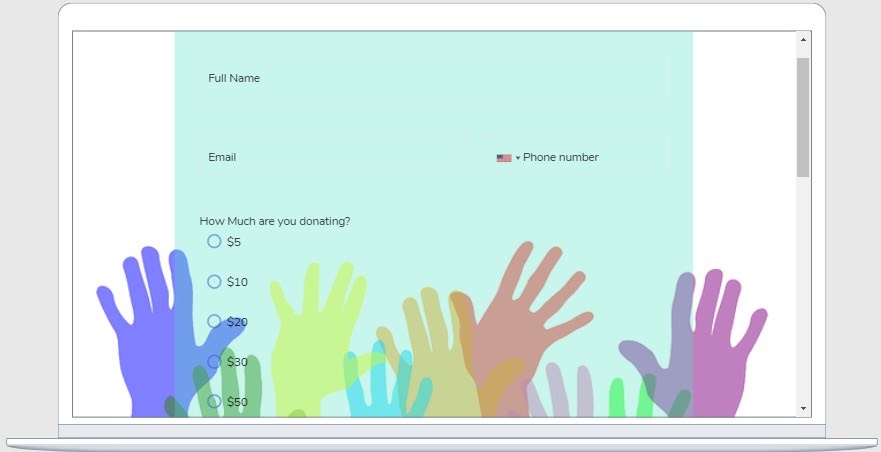
Build the best forms for your institution today. Start on the free plan (5 active forms, 100 responses a month, no credit card) and follow our step-by-step to build your donation request form.
Generate more leads and conquer more donors using the right form for your non-profit institution.
The first step is to log in to your FormBuilder dashboard. Then you will select a donation form template, describe the form to the AI form generator, or build a form from scratch.
Add a choice field with suggested amounts ($5, $10, $20 and so on) and use conditional logic to determine the next steps based on the value the donor picks.
Add the Stripe payment field to allow the donor to give straight from the form. Connect your Stripe account in Settings and set the amount, currency and a short description.
It’s time for you to personalize your form. Open the Theme settings, pick your colors and typography, and use your institution logo. Customize your donation request form.
Turn on email notifications so your team hears about each donation, and send the donor a copy of their submission as a confirmation.
Try FormBuilder for free and start working on fundraising for your nonprofit today.