Abandoned Cart Recovery: Email strategies to stand out from Competitors
In this article, you can find the best practices to follow when building order forms, shopper recovery emails, plus seven email strategies to bring leads back to close the deal.
How often have you added tons of things to your cart and left them there either because you’re still thinking about your purchase, or because an extra cost showed up when you were about to close the deal? This is not a reality only for you. People are doing the same when browsing your e-commerce.
The abandoned cart can become a big problem for your business, but, fortunately, there is a solution: Abandoned Cart Recovery Emails.
Abandoned cart recovery emails are simple messages to remind users of their shopping cart.
These messages can be improved when you follow strategies that will stand you out from competitors. And FormBuilder has the integrations to automate the follow-up so your recovery messages go out on time and stay branded and personal.
In this article, you can find the best practices to follow when building order forms, shopper recovery emails, plus seven email strategies to bring leads back to close the deal. I know you want to grow your business and revenue, so, stay with me.
What is online cart abandonment
Statistics are a straightforward way to prove any point, am I right? After all, how can you contest data based on research? For this, we realized that there is no better way to convince you that your business deserves a great abandoned cart recovery email strategy than using some stats on abandoned carts.
Cart Abandonment is more common than you think
An abandoned cart can mean a loss of $18 BILLION in revenue in a year to e-commerces.
This isn’t surprising considering how high cart abandonment is across the board. No matter what sources you check, the numbers are staggering: the Baymard Institute puts the average documented cart abandonment rate at around 70%, and some studies report even higher.
Long checkouts are considered the primary problem
The more fields you have on your checkout form, the higher are the chances of a high abandonment rate. Long and confusing checkout is the cause of 28% of abandoned carts.
This can be remedied by collecting payment with a secure processor like Stripe and adding only necessary fields to your order form. Plus, split a longer order form into short steps with a multi-page layout so it never feels like a wall of fields. Answers also save automatically as customers type, so a shopper who leaves and comes back picks up where they left off instead of starting over.
Automated personalization can increase conversions
Personalization is one of the top reasons for conversion. Customers like being called by their own name and appreciate being shown relevant content based on their preferences.
Everyone has received a recommendation for additional products (also highly recommended for cross-selling strategies) and this can easily be done with automated notifications that merge the customer’s name and product choice into the message.
5 main reasons for cart abandonment
Several are the reasons buyers give for cart abandonment, we are listing the 5 main causes of it and how you can prevent them.
Surprise extra costs
Unexpected costs that are added on, like shipping costs, represent 44,74% of cart abandonment. The solution can be to calculate in advance how much is the shipping for each state or county.
Lack of reviews
No product reviews or fewer reviews are the cause of 35,53% of the abandonment rate. A solution can be to ask existing customers for their reviews and testimonials and add them to your payment/order form.
Too pricey
Not surprising that the customer’s wallet is in 2 of 5 reasons for cart abandonment. Research allows users to compare product prices with other e-commerces at a rate of 34,21%. A simple solution is to make the offer outstanding, enable coupon codes in your form, start a reward program, or offer free shipping depending on the purchase value.
Security concerns
Meanwhile, security concerns are responsible for 22,37% of cart abandonment. Make sure to create secure payment forms, and display security badges and use secure methods of payment, such as payment gateways like Stripe and Paypal.
Slow delivery
And, at the bottom but yet a great cause of abandoned carts (being 17,11% of it) is because the delivery is too slow. To overcome this you can use a faster delivery company or offer more than one shipping company (display their fees) so the customer can choose the one of their preference.
What is an abandoned cart email strategy?
An abandoned cart email is a follow-up automatic custom message that you can set up to be sent every time a prospect leaves the cart without submitting the order.
You are reaching out to someone that already has a big inclination towards shopping at your store. By contacting them you increase your chances of selling your products. From all automatic emails sent to those that had abandoned your form without completing the order, 45% of them are opened. This means that from every 100 prospects that left, 45 will open your abandoned cart email (these are 45 chances you have for convincing them to make a new purchase).
Of all 45 people that had opened the email, 11 will end up finalizing the purchase. And you can increase this number by using the right strategy we present to you in this article.
How can I track the form and send automatic and personalized follow-up emails?
Whatever online form you are using to interact with your customers, you need two things: a way to know who dropped off, and an automated message that asks them to come back. Most e-commerce platforms (Shopify, WooCommerce, BigCommerce) track abandoned checkouts for you. If you sell through a FormBuilder order form, connect it to your email tool with Zapier or webhooks so every order and follow-up is automated.
You can easily contact the lead with a fully personalized email, adding the lead’s name and the product they wish for, as an example.
7 abandoned cart email strategies to stand out from Competitors
When we talk about recovering abandoned carts, a well-known email strategy is to offer a discount so the customers have an incentive to complete the purchase. Although effective, this is an overrated strategy, and something people end up expecting already. To stand out from competitors, you must go further and find new strategies that can be more persuasive and fit your business and your audience better.
Remember that any good email tool lets you customize your automatic messages with all of the elements you wish, and you can easily use each of these strategies to build an outstanding email.
1. Social Proof
Maybe you’re a new business, with new products, and only a few people have bought from you so far. Since you want to grow and sell more and more, you need a strategy to convince people to buy from you.
That’s why you ask for your clients to review your business. With this social proof, you can gain the trust of new customers which has a greater probability of closing the deal.
Add to your email message the ratings for the product that was left in the cart, and also reviews from happy customers, and watch the increasing number of click-throughs.
2. Compelling Subject line
Personalization is key. A personalized email subject line, that carries the client’s name on it, has an open rate of 26% higher than a generic email subject line. And a captivating one, with a very catchy copy, has a 33% open rate.
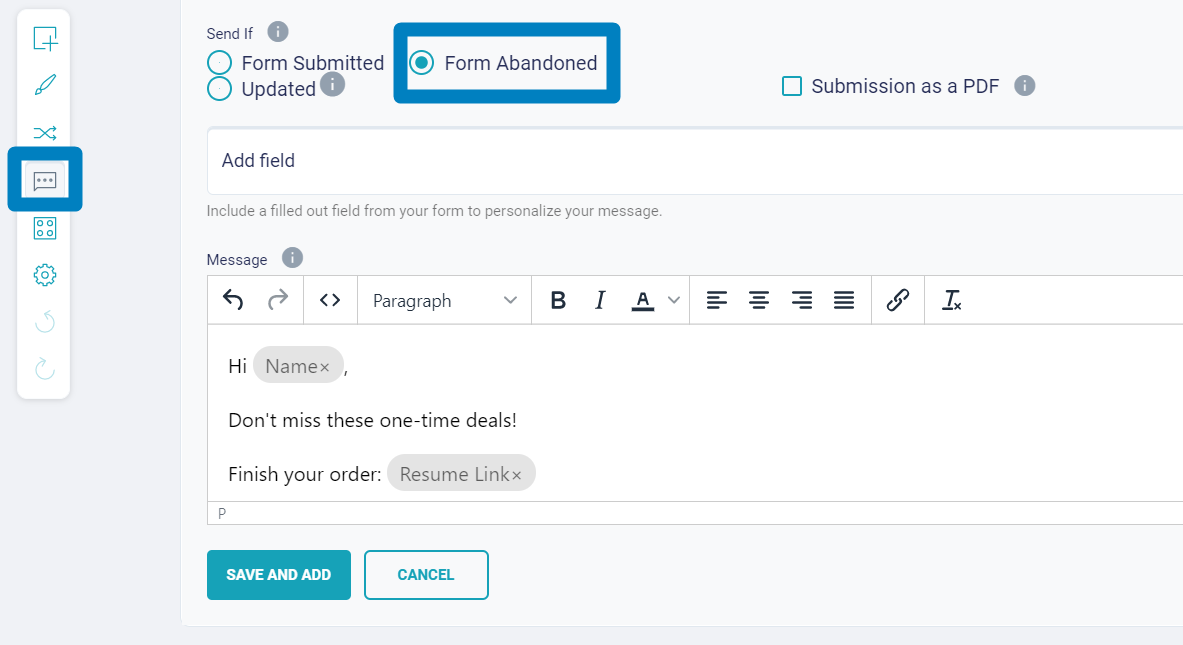
You can use to call the attention of your lost lead some elements like:
- Add an Emoji to the subject line
- Create a line that stirs curiosity
- Mention their interest (like the name of the product they’ve chosen)
- Create FOMO (fear of missing out)
Be creative, smart, and try your best to not sound like spam.
3. Show you’re a secure website
Besides the social proof, you can add some badges that prove your website is secure and that you’ll not store any payment data from your clients. And that you don’t share any detail with other companies, other than the payment gateway you choose.
People do not always trust the internet, for fear of being a victim of an online scam. Which is a real thing, by the way. But with secure online payment forms, you can overpass this and get more customers towards your business.
Add all the information about the security of your site, form, and payment method, to help the prospect relax and go back to the form and finalize the order.
4. Spotlight only one product from the abandoned cart
Did the lead leave the cart with more than one product in it? Be careful about what you add to their shopping cart recovery email.
Most businesses will send their consumers a long email with all the products the client left in the cart. Well, that can be overwhelming to the customer and ending up just confusing them.
To make sure you stand a chance to make the business, send only one product from the cart, the most well-rated one, not forgetting to add how many “stars” the product has and at least one review from a client about their experience with the product.
When your form data flows into your email tool, you can merge any field from the order into your message, so you can easily have the product name embedded in the email.
5. Instigate customer loyalty
Use strategies to not only convince the customer to submit the order, but also use this opportunity to create brand loyalty by writing a personalized copy, catchy Call To Action (CTA), and offering the chance of being part of a reward program.
Taking advantage of your loyalty, referral, or reward programs is a simple and smart way to convince not only one purchase, but to capture a new ambassador for your brand.
Offering a discount can be an easier strategy, especially when you’re addressing a first-time consumer. But for a regular client, the best strategy is to offer something beyond a simple discount.
Separate your email list between new and old customers and send the most appropriate email copy to each. Recover new ones and generate loyalty among old ones.
6. Automate your email
Sending one, two, even ten emails a day may not look like much trouble. But as your business grows, so does the number of emails you have to send by day. And that is a very timing-consuming task and not a very productive one.
So, no matter how many abandoned carts you have on a day, you can automate them, without losing the human tone and keep them very personalized, so the lead can feel unique.
Your email platform lets you customize the automatic email, adding images, gifs, videos, and merged form fields, like the name and product. So, your email can reach out automatically to everyone who abandoned their order with all the strategies to convince them to come back, and also all the best practices a good shopping cart recovery email needs to be polite and convincing.
7. Pay attention to your email structure
After the subject line, that must be very catchy so the lead will open the email, the copy is the most important part of your email. It contains all the security details, a custom message, social proof, and also a link for the client to finish the order.
You must structure the email copy so it is intuitive and has a flow between the information, and it doesn’t just approach the consumer in a scary and inquisitive way.
A few tips for your copy:
- Start by saying how great the customer is, and that their choice is one of the top ones. You can prove it by showing the reviews and testimonials.
- Show the product image, its price, and a link to the product page or to the order form.
- Add your security certificates.
- You can be funny in your copy. Take advantage of creativity.
- Create a clear and captivating CTA button.
- And be simple, using only necessary elements.
- Finish the email saying your team is ready to answer any questions the client may have.
Following these strategies may not bring back ALL of those who abandoned the cart, but will definitely increase the number of those who change their mind and submit your form.
Abandoned Cart Emails Best Practices
The previous strategies will help you increase your revenue by recovering more lost clients. But we have a few more tips that you can use to guarantee your shopping cart recovery email will be opened and people will return to your form.
#1. Timing
Set up your email to be sent at the most appropriate time. I mean, you can’t send a recovery email minutes after a person abandons your form. You must respect their thinking time.
But, waiting too long can also be counter-productive. Waiting for a day will give you only 11% of the conversion rate. Although, when you send the recovery email an hour after the cart abandonment you have a 16% conversion rate.
In conclusion, finding out the better suitable time for your audience is the best way to reach them out at the right time and increase your conversions.
#2. The right call-to-action
A CTA button must be designed to convince the prospect to click on it. Otherwise, it is just one more button.
Colors and words of your CTA have to be chosen according to your industry, and also following the “personality” you gave to your brand. If it is a more conservative brand, don’t try a CTA with a joke since this is not what your audience wants nor expects from you.
The most important is that the CTA brings the customer back to your page.
#3. Link to the Product Page
Your CTA can conduct the prospect back to the checkout page, but it is a good practice to have a link to the product description page, so the customer can see it again, read more about its details, and check out all the reviews and testimonials.
This can help them make a decision.
How FormBuilder helps you recover abandoned carts
FormBuilder does not track partially filled forms, so the abandoned cart email itself is sent by your e-commerce platform or your email marketing tool. What FormBuilder does is make the order form short, secure and connected, so fewer people abandon it in the first place and every order feeds your follow-up automation.
For this part of the explanation, we’re going to assume that you’re working with FormBuilder forms to sell your products. Remember that with FormBuilder you can collect payment straight on the form using the Stripe payment field.
When you create your payment/order form you can set up integrations to make your form do the heavy, time-consuming jobs for you, like adding every buyer to the right email list or CRM the moment they submit.
Use a multi-page layout so the customer only sees a few fields at a time, and use conditional logic to hide questions that do not apply to their order. Answers save as the customer types, so someone who steps away can return later, from any device, and finish the order where they left off.
Use information from the form in your emails to personalize them. In tools like Mailchimp or Klaviyo, all you have to do is write the copy and select which merged field will complement the text.
Hi {{First_Name}}, ready to buy your {{Select_Product}}?
Use the native Google Sheets integration to organize all form data. By doing so you can compare those who came back to finish the deal with those who didn’t, and redirect each to a specific email list.
How to set up the follow-up automation
Step 1: Create your form. You can use one of the multiple templates FormBuilder offers, or build your form from scratch.
Step 2: Add all the fields you need to have a purchase completed: name, delivery address, email address, product choice, payment, etc.
Step 3: Turn on email notifications so your team is alerted, and turn on the automatic confirmation email so the customer receives a message with your own subject and text for every completed order.
Step 4: Connect the form to your email marketing tool through Zapier or a webhook. From there, your email tool handles the timed follow-ups and the abandoned cart sequence for customers who started but did not finish checking out on your store.
5 Examples of Abandoned Cart Recovery Emails
Great copies, catchy CTA, personalization. These examples bring it all. Use them as inspiration to create your own. And don’t be afraid to conduct some A/B testing to find the perfect fit for your business.
Casper's unique call-to-action
The secret ingredient here is: use your business expertise to start a conversation. Casper sells bed items, therefore starting the email saying something like “Come back to bed” makes more sense than “You forgot something”. And they also have social proof on their email, bringing a customer’s review about the same product in the cart.
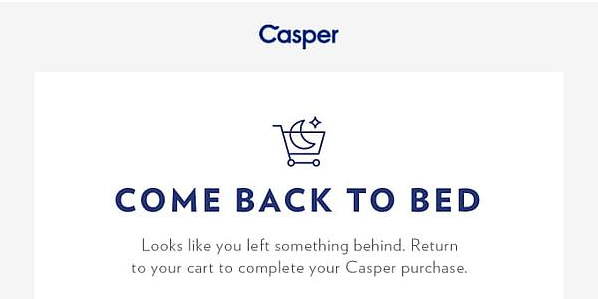
The key is to use your products as part of your abandoned cart recovery email.
Ugmonk's lighthearted message
Personalization! Who doesn’t like to be treated well and feel unique? Use your customer’s name on the email, write a copy like if you’re talking to a friend, and add all elements that will recall the customer’s choice.
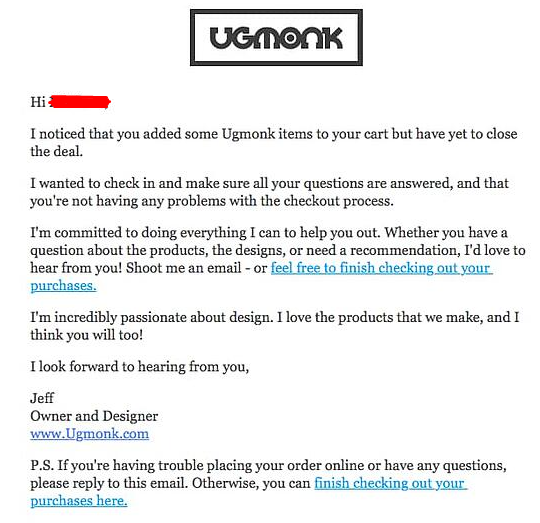
The key is to never let your client think they are receiving an automatic message written by a bot.
Google's FOMO pressure
Google prefers a more urgent approach. They remind the lead how fast their product sells out and use their copy to convince the user to close the deal, adding the product left in the cart in their email.
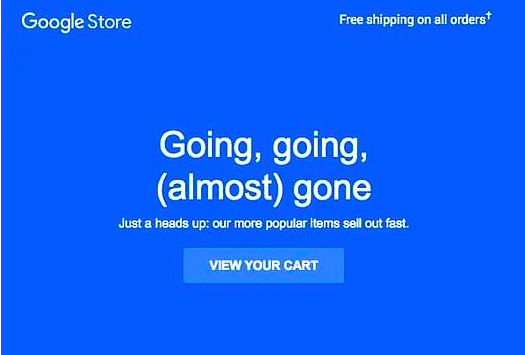
The key is to create FOMO to sell out.
Dollar Shave Club's self-confidence
Explain why you’re great and different from other businesses can also help you get the deal. That’s the aim of Dollar Shave Club. In their email, they add a list of reasons why you should join the club, with an image that shows exactly what the user will get in their box.
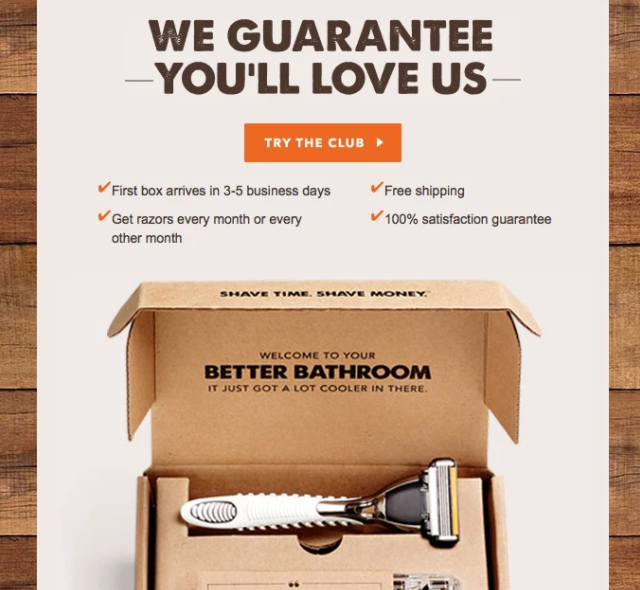
The key is not to be shy and show off what makes you great and give all the reasons why the lead should choose your business and products.
Think Geek's friendly humor
Funny and very aimed at the geek audience. In their copy, they add references that their customers can relate to and recognize, making it funny and interactive. And more interesting is that they not only make a joke and show the product left in the cart, but they bring up more products, in an attempt of making a cross-selling.
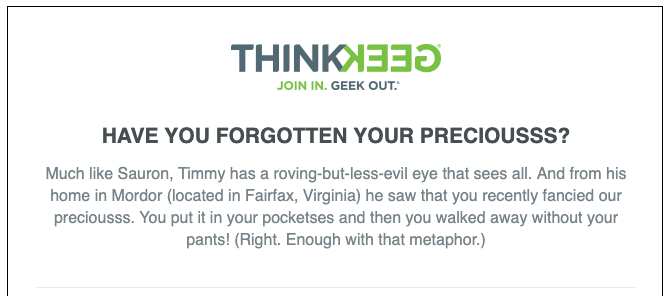
The key is that you should use the tone that your audience expects from your business and create a brand identity.
A quick reminder here. You can go further with automation and add the client's info to a CRM, or to Mailchimp, Klaviyo, etc., and add them to a drip email marketing campaign. All to make your job easier and increase revenue.
Start building with FormBuilder now and level up your e-commerce.