10 Best Zapier Zaps Ideas for Online Forms
Once you start automating your work, you won’t go back. Get the right tools working for you - and working together! -with Zapier. Start to delegate time-consuming and repetitive tasks to technology.…
Once you start automating your work, you won’t go back. It just takes getting the hang of it with the proper automation tool, like Zapier, to delegate time-consuming and repetitive tasks to technology, really.
Online forms by FormBuilder already have native automation settings to streamline customer intake workflow. But why stop there? Combine automated online forms with Zapier Zaps to double productivity gain!
Whether your goal is to save time and money; to make up for limited staff, or to expedite processes, Zapier offers a range of automation solutions for your business.
In this article, we have curated the best Zapier Zaps ideas for online forms to boost time management, efficiency, scalability, and growth for any type or size of business.
Check them out!
What is Zapier
Source:
Imagine an orchestra where each individual musician is proficient in their own instrument. It is the job of the maestro to direct and combine all these different talents together to deliver one harmonious symphony.
Metaphorically speaking, Zapier acts like the maestro conducting the integration between more than 9,000 apps.
Users can mix and match apps like Google Sheets, Google Calendar, Dropbox, Trello, Mailchimp, Slack, X, Facebook, Stripe, Shopify, Microsoft Outlook, Asana, and of course, FormBuilder, to only name a few.
All apps are sorted out by categories to better help users to find the right fit in line with the purpose of each app. Or they can experiment with Zapier’s pre-built workflows.
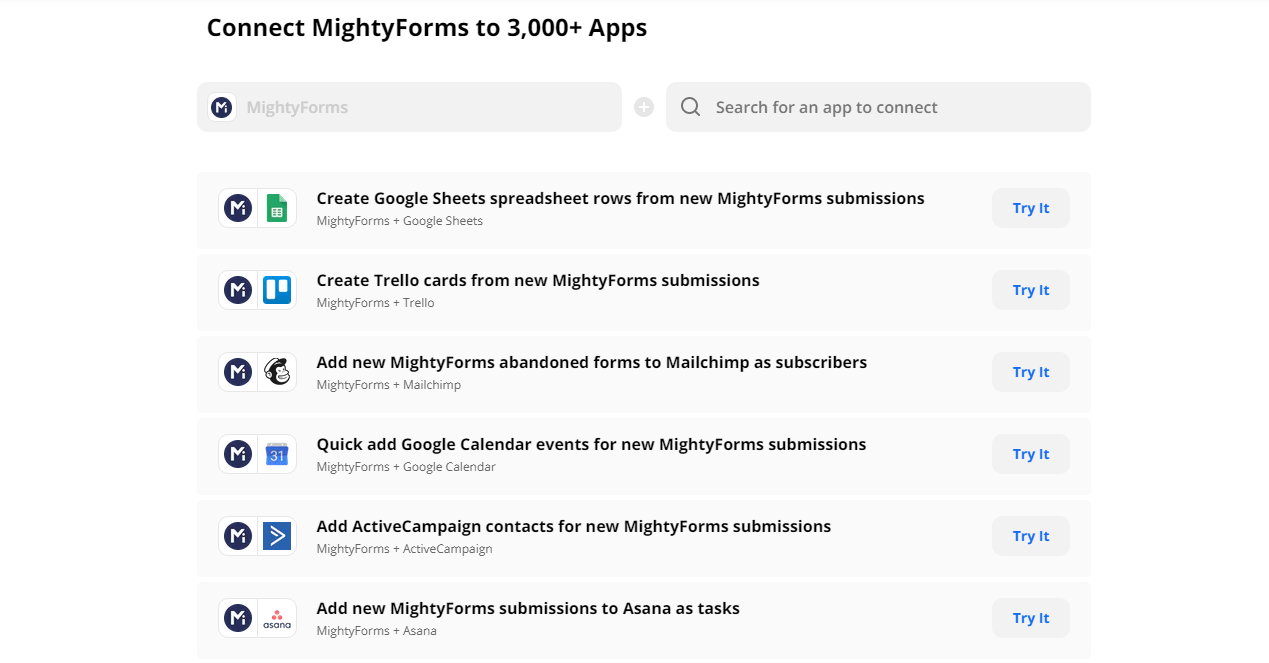
The idea is to allow users to combine expertise from different platforms to create a custom workflow according to their needs and goals. Zapier then “translates” these different web APIs (or the Application Programming Interface) to ensure one smooth seamless connection.
Founded in 2011 in Columbia, Missouri, Zapier is now a fully remote global company. This no-code automation platform says it is trusted by more than 3 million businesses worldwide, all automating their busywork.
Helping individuals and businesses to increase their productivity and efficiency has paid off. A January 2021 secondary share sale valued Zapier at $5 billion, and the company has been profitable since 2014.
And it’s not hard to understand the allure of Zapier. We’re living in the era of technology, where thousands of startups are created daily to offer solutions to personal and business problems. So, forget about cutting out the middleman. Having Zapier to mediate the best of both worlds will save you time and improve any task performance.
How Zapier Works
Like a diligent assistant, Zapier’s interface makes it all easy to be of service. No coding is required in order to program any desired chore.
Zapier’s motto is to help anyone to work smarter, not harder. This goal is achieved by Zaps (catchy, right?) or workflows that connect different apps to automate a certain task.
These Zaps are activated by Triggers or a specific activity chosen as the command that will initiate an established action from one app to another. So, basically, Zapier Zaps takes place in three steps:
1.Choose a Trigger
From the origin app, select what should trigger a workflow. It can be a new event registration or an RSVP confirmation, for example.
2.Choose an Action
Here you tell Zapier what to do next. The conditioned action makes Zapier pull the data from the origin app and transfer it to the destination app.
3. Zap prompted
Whenever the selected trigger happens, the programmed Zap will automatically carry out the next task for you. Using the previous example, it can take the event registration or RSVP information from a form builder app like FormBuilder to automatically populate a list of attendees on Google Sheets, for instance.
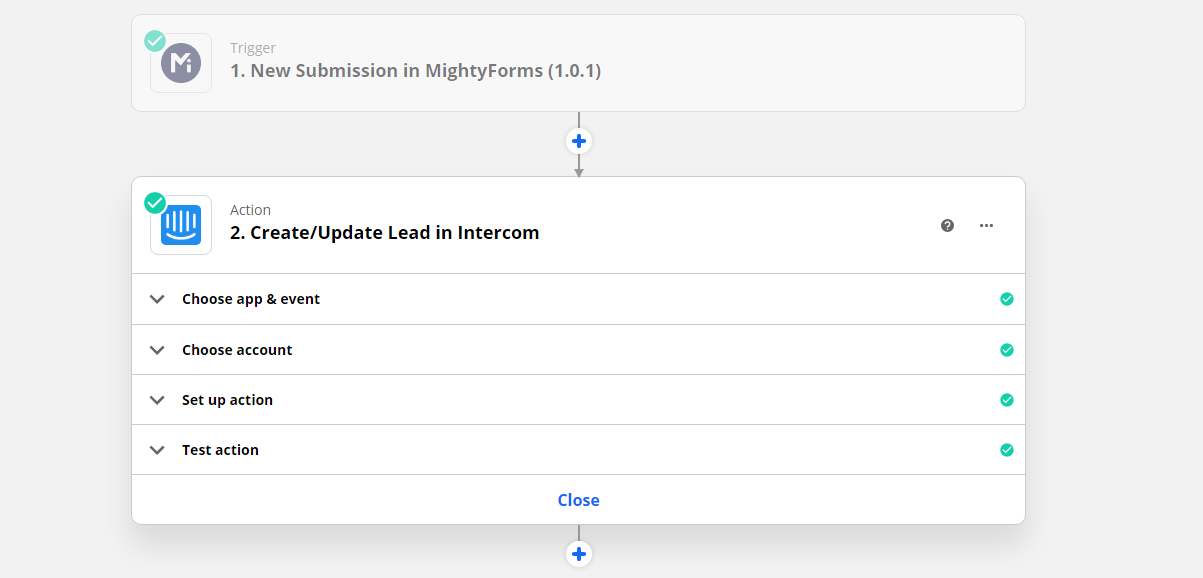
Still, with this example in mind, consider the amount of time saved from this simple Zap. It may not seem like a lot if you only got a few registrations or RSVPs to process, that can easily be done manually.
But imagine if you are handling a huge event with multiple dates and venues. Taking information from one platform, then copying and pasting it to a spreadsheet a hundred or a thousand times?
Zapier Zaps not only saves countless hours but will also ensure data accuracy since the automated task is seamless and safe.
And if a single-action Zap saves time, then multi-step Zaps saves a lot more! That’s right, you can stack Zaps in a chain. So, continuing with our example, you can set another trigger for another action after a list of attendees hits a certain number of people, for instance. Such as, the next Zap can transfer the list from Google Sheets to an event management app for venue booking.
If you think about it, Zapier can automate tasks that you already do manually, or it will help you discover smarter ways to carry out your daily activities.
FormBuilder and Zapier Integration for Automated Workflows
Now that we’ve settled what Zapier is and how it works, it’s time to show you what it can do with intake online forms.
Considering FormBuilder as your starting point, we’ll show you how to take your forms to the next level, using Zapier Zaps to connect collected form data to other specialized tools and web services.
FormBuilder connects to Zapier through its integrations directory, with a dedicated page for each popular app, which makes this integration as straightforward as it can get.
In case you’re not familiar with FormBuilder, you can build your custom form from scratch, from a template, or with the AI form generator. Furthermore, we have covered before in this blog tips to build alead generation form with failproof add-ons andhow to leave it on autopilot.
Once your form is created with FormBuilder, easily integrate it with Zapier for automating workflows to better leverage form data. Just pick the app on our integrations page and follow the steps to create the Zap.
10 Best Zapier Zaps Ideas for Online Forms
Online forms are as versatile – and powerful - as you can imagine them to be. They can serve many purposes likepayment forms;fundraiser forms;lead generation forms;multilingual contact forms;order forms;customer feedback forms;event registration forms; and so forth.
From the FormBuilder dashboard, you get to view all submissions and the form analytics behind them. All gathered data can help you get insights about your audience to improve your business.
But this valuable data can be further managed and leveraged by other online tools. As mentioned before, Zapier allows you to instantly connect your forms to thousands of other apps listed in their database.
With FormBuilder as your origin app, the possible combinations are endless. You can create custom automated workflows with platforms you’re already familiar with or explore new ones.
For starters, the trigger you will use is:
New Form Response – Zaps will be triggered when a new form submission is issued
To get you inspired, here’s a readily active list of the ten best Zapier Zaps ideas to connect your forms by FormBuilder, as a jumpstart:
1. FormBuilder and Google Sheets
The very first recommendation is aimed at enhancing your form data management. All collected data from FormBuilder can be viewed from our platform or exported. FormBuilder also has a native Google Sheets connection, so you do not even need Zapier for this one. Either way, automatically sending all data to Google Sheets will ensure an extra backup, to say the least, since it will be stored in the cloud.
Since Google Sheets can be remotely accessed by anyone with permission from you, it’s easier to share form data with team members this way than to share your FormBuilder access, to be honest. Besides, you get to organize data in a spreadsheet just the way it works for you. Then you can crunch numbers to generate reports and graphs for ROI analysis and KPIs measurement, for instance.
2. FormBuilder and Trello
Are you a visual person when it comes to project management? Then this Zap will help you visualize form data as sticky notes on a board. Well, virtually. Trello is great for handling stages of complex projects, transforming data into cards. It allows users to better organize and prioritize tasks.
If you’re running an online bakery, for instance, you use this Zap to send submitted orders as Trello cards on the kitchen staff board. Custom orders or special requests can go to a card on the Sales or Customer Service board, so they can follow up and offer a discount or a sample.
3. FormBuilder and Mailchimp
Mailchimp is a great all-in-one integrated marketing platform used by so many well-known companies. But to get an email marketing campaign started, you need a mailing list. FormBuilder connects to Mailchimp through Zapier, and with a Zap you get to define and automate the next step.
Automatically add newly submitted forms to your Welcome Email mailing list with one trigger. A second step in the same Zap can tag the subscriber based on their answers, so each contact lands in the right audience segment.
4. FormBuilder and Google Calendar
This Zapier Zap will work just like your secretary booking appointments for you. If you’re a service provider or personal instructor, you don’t have to waste time jotting down service request forms on your agenda. Get your appointments automatically booked on Google Calendar with this automated workflow.
If you’re an event planner, needless to say, this Zap is essential to manage and avoid overlapping events. You can keep up with the headcount of attendees for a specific event by connecting event registration forms by FormBuilder with your Google Calendar.
5. FormBuilder and ActiveCampaign
Growing a business requires acquiring more customers while retaining current ones. Let this Zapier Zap help you juggle new leads into the Customer Journey. By transferring form data to ActiveCampaign, you can automate customer experience efforts to ensure that no lead is ignored.
Try building your form with conditional logic so the collected data can be transferred from FormBuilder to ActiveCampaign via Zapier Zap for precise customer segmentation. If you’re running a loyalty campaign, then time is of the essence and this Zap will waste none.
6. FormBuilder and Asana
Automation and remote access are a match made in heaven for distributed teams. This Zapier Zap is here to facilitate team management, so everyone is in the loop of what needs to be done wherever they are, whenever a new lead is received.
Easily assign FormBuilder triggers to a specific team member in the Asana app. Or the opposite, if a new lead requires the involvement of an entire crew of people, this Zap will create tasks for each all at once at the same time.
7. FormBuilder and Slack
Another popular app widely used for remote work, Slack is a business communication platform. Slack lets you create group chats through Channels or private one-on-one discussions.
This Zapier Zap enables form submissions to trigger a Channel notification on Slack. If you’re dealing with sensitive data or selling perishable products, then automating new submission notifications straight into your business channel on Slack will ensure protocol compliance and urgency.
8. FormBuilder and Airtable
If you need to extract more detailed information from your business data, then a spreadsheet view might not be enough. Airtable is a cloud collaboration service and allows users to store and organize information on relational databases.
You can automatically feed this highly analytical app with your submitted form information as Airtable Records. This Zapier Zap will instantly populate your Airtable database with information collected by FormBuilder.
9. FormBuilder and Microsoft Excel
A collaborative database sure provides advanced analysis, but sometimes you just need to calculate data and nothing beats a classic like Excel. If you’re running e-commerce and need a simple inventory spreadsheet for follow-up, then try this Zap.
Every new submission through FormBuilder can trigger a row on Excel. If it’s a new order, you can quickly have the form data added to your “sold” column. We understand that sometimes all you need is to translate form submission into absolute numbers and this Zap is definitely a shortcut.
10. FormBuilder and Salesforce
The last Zapier Zap on this list is aimed at scaling businesses looking for a great CRM app for growth. Employ alead capturing form by FormBuilder as the entryway for customers. Then send the collected data seamlessly to Salesforce as Records for further lead nurturing.
This Zapier Zap will set up a Customer Journey for your business from beginning to end. Let Salesforce Records based on collected form data guide your lead towards conversion, so no opportunity is lost.
Collecting data and automating workflows has never been easier with FormBuilder and Zapier integrations. The workload once performed by several people requiring additional hours can be seamlessly automated like magic. Zapier Zaps will simplify processes so you can save time and increase productivity, leveraging online form data for business growth.