How to Build a Subscription Form That Boosts Your Business
The subscription business model is here to stay. With more and more startups rising from code to offer solutions and commodities, you can also adopt a subscription business model to your own service…
The subscription business is here to stay. This business model is simple, both for the customer, who just has to renew the service contract, and for business owners, who can have projected revenue.
Customers don’t have to go back to searches and decision-making every time they need the product or service, therefore, they can save time. And also they can count that the product or service will be there for them as they need it. No matter if it’s monthly, daily, or any other time period contract to receive the product, or the service.
And there is no better way to get more subscribers than using a subscription form.
Subscription Forms are to subscription businesses like a gate that allows new customers to get in touch with the business and convert.
Let’s say you have a software subscription business. Your customers and users can count on your services, trust its excellency, and always know they can benefit from the tool for a fixed price. So, no matter what, they can forecast their expenses. And you can count on a constant revenue.
As you improve your business, more leads can convert. The fact that the price is a constant is one of the main reasons that allows people to trust and choose subscription businesses when they need constant services, or just want to be part of a club and receive products from time to time in the comfort of their home.
As to how to offer the subscription, forms are a great deal. You can add info about your offer and provide the payment method for it. All in a combo that benefits both your business and customer by saving time and combining everything in a single place.
In this article, you’ll get to know more about subscription businesses and how you can benefit from using subscription forms at your own business.
What is a Subscription Business
Do you know when you pay for a product that gets delivered to your place periodically? The newspaper that you receive every day, or maybe a magazine, every month. Well, that's a subscription business model.
A subscription business model is when the customer pays a recurring amount to receive a product or service periodically.
Monthly book subscription boxes are a great example. The user pays a fixed price every month to receive a new book based on their preferences.
But it can also be a service, like software. You pay yearly, most commonly, to get a great service back, maybe it can be the anti-virus you install or the software you use to work. Like streaming services, for music or movies, where you pay monthly and get back a selection of music or movies, with a personalized experience.
If you pay a recurring price for a product or a service that you also acquire from a recurring period, you’re using a subscription business.
And you can do the same with your own business by adapting it to the subscription business model.
What is the difference between Subscription and Recurring Revenue
Sometimes these two terms may get confusing, after all, they seem to be talking about the same business model. Although similar, they are not the same.
In a subscription business, you have recurring payment for a product or service. While recurring revenue refers to a certainty that you will have the revenue, in other words, you can be assured that your products or services will have projected revenue.
In both cases the business works on regular intervals, maintaining consistency. Subscription is one kind of recurring revenue model, but there are more kinds of recurring revenue than subscriptions. Our focus, however, is only on the subscription type of business.
Advantages of subscription-based business
One of the most beneficial results in having a subscription business is that you can create a closer relationship with the customer, getting to know their behavior and tastes. This is what helps you to offer the best customer service.
When you know your customer you can predict their needs and reactions, prepare a better service, or offer a better product that can end up delighting and generating loyalty. The customer can even become an ambassador of the product, promoting it to family, friends, and social media followers.
Subscriptions can also attract more customers. That’s because you’re attenuating the cost for the customer. Instead of paying for the product at once, the same amount can be diluted among the months along the year, making it easier for the user to pay for it. And making the product offer more attractive.
Another perk can be what we’ve mentioned already, which is you can count on the revenue, projecting it. Since customers are making payments regularly, you can always know your revenue, being able to adapt to the business needs.
One last positive point to mention on having a subscription business-based is how it affects the Customer Acquisition Cost (CAC). You see an increased return on CAC investment. That’s because the user stays with the business for a long time. So, even if you continue spending the same budget for customer acquisition, your revenue tends to increase month over month. Your retention rate grows, as the user stays longer, and you can easily conquer their loyalty, by not only offering a good product, but also excellent customer support and experience.
Online forms and subscription businesses
Let’s begin by answering the “what are online forms” question. Online forms are documents that work to collect information from the respondent, in this case, prospects. You can gather data as name, email address, and any other data to confirm a purchase. All through a web form, that can work as a proof of purchase and contract between customer and business.
Now that you know what are online forms, let’s talk about their potential and how your business can use them to grow. Especially, let’s talk about how subscriptions forms work to assist you and your business.
Why add an online subscription form to your business page
Online forms are great to collect data and contact info from customers. It also works as a helper when it is about online sales. Webforms streamline the workflow and reduce the time and money wasted.
But if all of this is not enough, let’s talk about why your subscription business must use a subscription form.
An online form can do the work for you when you automated it. You can design all forms for high-performance, enabling automatic functions like email notifications, an automatic confirmation email to each new subscriber, and a custom thank-you page. Besides, form analytics show you how many people opened, started, and completed the form, so you can monitor its performance.
You can set up payments straight into your subscription form. This means that you can create subscription forms that not only bring more leads but also help with conversion. Using the Stripe payment field, the customer pays right on the form, the money lands in your own Stripe account, and you create an easier path for the user to sign up for your products or services.
Subscription forms have the power to streamline your sales increasing your revenue. That’s because customers have all the information about your product, company, and payment on it, making it look professional and trustworthy, which can make people convert and become customers. And the generated trust encourages loyalty, increasing your revenue and ensuring its projectability along the way.
By using subscription forms you can boost your sales since it makes it easier for the lead to convert. The form, as we said, contains all relevant information you can add to make the visitor interested in your subscription offer. With all the information they need to make up their mind so the act of making a decision is shortened and certain.
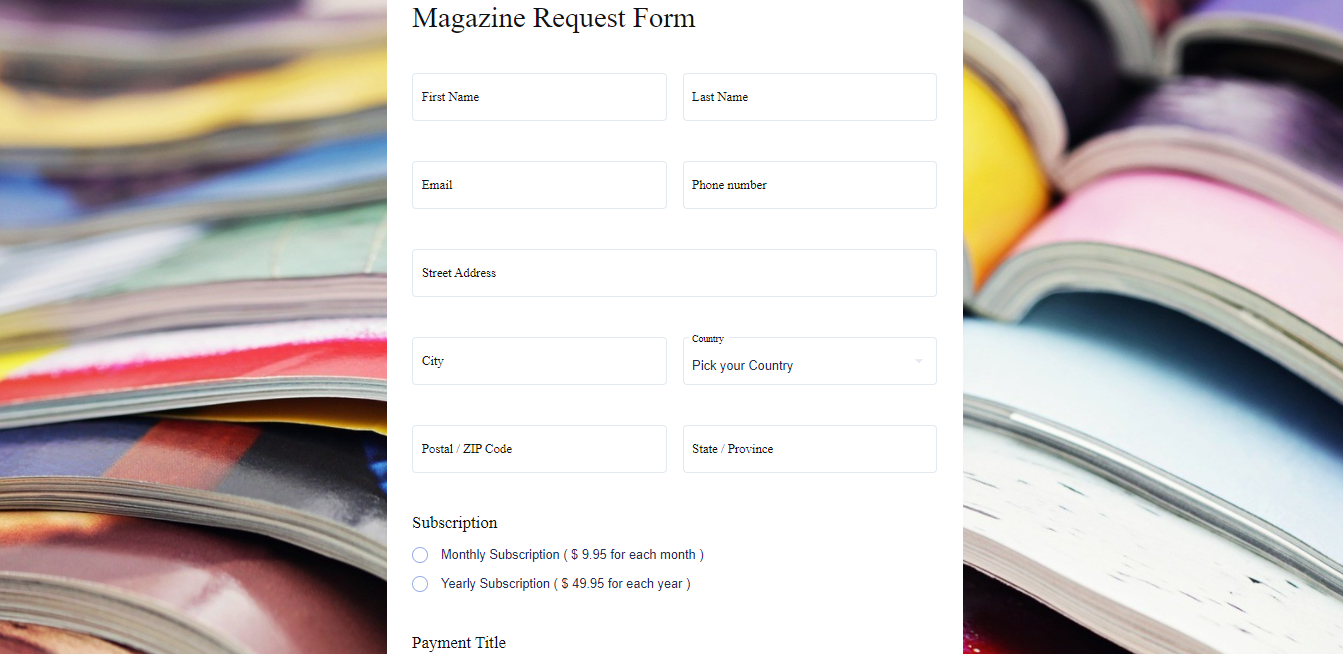
Example of a subscription form
You can build your own form from scratch. But you can also build from a template, making it easier for you to adjust and adapt the concept to your business needs.
Only remember that your forms must encourage conversion, which means that it must contain details that call the attention of the visitor. We will talk about it later. Now, let’s focus on the example given so you can have an idea to build your own subscription form.
Our first tip is to make it clear what is the form for so the lead can be assured that they are in the right place.
Then you will ask for necessary data, like the lead’s name, email address, and, if you must deliver goods, the address for the delivery.
Our second tip, which is more a bit of advice, is for you to select multi-page forms. When you do so the lead won’t feel overwhelmed by filling out the form, reducing the risks of abandoning it.
Last, but not least, is the payment method, which must be on the form. Preferable to be made straight on the form. Don’t let the lead waste their time wondering how they make the payment. With the Stripe payment field, the lead pays on the form, and you manage the subscription plans and renewals from your Stripe dashboard.
You can use this template and customize it according to your needs. It’s a great example of how you can use Stripe to sign up subscribers, no matter how long the billing period is.
Meanwhile, you also can edit and make it yours from this another template that displays the conversational, aka multi-step, form. Each step presents a topic with the proper fields to make the delivery and payment selection.
So, no matter if you’re offering weekly, monthly, or annual subscriptions, you can find the perfect way to let the purchase be completed.
Elements that a subscription form must have
For a subscription form to be complete and increase the conversion rate it must contain elements that help with the task. It can also be automated, allowing you with more time to dedicate to other important tasks. Any tasks you automate by using a form automation software, such as FormBuilder, saves your company money and time. Do not waste employees’ time and creativity with boring time-consuming tasks.
Integrations
Integrations are what make your forms productivity raise, making it customized and with multiplied efficiency. With the right integration, you can automate the processes, reducing the piling work you and your team have to perform. The perfect integration can make your online form work for you. For example, you can easily receive and organize any data from the form, automatically, using the native Google Sheets integration, or send files to Dropbox or Google Drive through Zapier.
Proper fields
You must be absolutely sure about the fields you add to the subscription form. Asking for too much information can make the lead drop off the form. And a non-submitted form can lead to a lost customer unless you make efforts to conquer them back. So, to avoid such wasting effort, design your form with the right fields, asking for extremely necessary information only. This helps you focus your efforts on delighting leads, instead of reconnecting with them.
Proper Design
You know the saying about not judging a book by its cover. But you also know that the cover does matter to the book being sold. The same goes for the Subscription Form you’re building. It has to be beautiful, mobile-friendly, responsive, functional, easy to fill out , and it has to be pleasing to the respondent, calling their attention and making them want to finish filling it out , reducing the abandonment rate. Make sure your design resembles your business identity and never forget to add your logo to your subscription form.
CTA
A well-made Call to Action is the difference between success and failure to attract more leads to fill out your form. A CTA is a gateway for the lead to access your form, giving you their data, and converting them into new customers. Be careful building your CTA, using the right words. Knowing your audience, by coming up with a buyer persona, is an important step to build the CTA that can encourage conversions.
Integrations that boosts your subscription forms
As I said before, integrations are the secret to a successful subscription form. You can automate the tasks, gather all the information you need for your business to perform properly, and convert new customers, all using the right integration.
Let’s say you want to have more time to work on your products, then you lack time to delight your customers. All you have to do is connect the form to your email tool, like Mailchimp or Brevo, through Zapier, and set up a welcome sequence there. Write carefully each message, so it won’t sound like a bot had sent it, and merge in form data, like the lead’s name, to give that special touch of exclusively made to each lead. And then, the form can work for you, sending delightful messages to everyone who submits it.
More integrations that let you free to accomplish other tasks:
Stripe
Stripe is a payment platform made for all kinds and sizes of businesses. This means that, even if you’re a solopreneur, you can easily benefit from the service offered by Stripe. And with FormBuilder your forms can become high performance using the native Stripe payment field, which allows you to receive payments straight on the form, on every plan, with no platform fee.
And the best part is that the money goes to your own Stripe account, where you already manage products, plans, and billing periods. Great news for your subscription business, am I right?
Google Sheets
You can see all the data submitted on a single file, updated automatically. All you have to do is to enable the Google Sheets integration. By doing so you can have reports and organize all the information, keeping all data stored in a single place. With this, any time you had to waste looking for a single customer data is now a thing of the past With Google Sheets integration you can access all customer data in a blink of an eye, saving time.
Form Analytics
Can you imagine the power of knowing where leads drop off your form? It is like having a superpower that allows you to adapt each form, making it perfect for your audience. FormBuilder's form analytics show you how many people open, start, and complete each form, so you can spot the step that loses subscribers and fix it. Stop losing leads over a poorly designed form.
No-code Form Builder for business forms
When you use FormBuilder to build your form your life gets simpler. All you have to do is create a form, from one of the templates, from scratch, or by describing it to the AI form generator, using all the features of the form builder. Do you need a new field? Just drag-and-drop it or just click on the ‘Add’ button. Did you decide one field is no longer necessary? Easily delete it by clicking on the trash bin icon. Regret a decision? Just undo the action.
And all this without a single knowledge of coding needed.
Build the perfect subscription form for your business, with its own identity, using FormBuilder form builder made especially for no-code founders.
Start building today for free.