How to Create a Contact Form and Leave it on Autopilot
Once your contact form is published, you should never think about it again. You should not have to keep logging in on your form builder to follow up on submissions. You should just reap the benefits…

Providing a contact form on your website is web design 101. It’s all about establishing a communication channel and presenting your business open for interaction.
But let’s face it, is a non-automated contact form that much different than a paper form? Just by being available online, is it a competitive edge at this point?
Did you ever think to create a contact form and leave it on autopilot, managing itself?
By now you should know that FormBuilder lets you build fully responsive and customizable lead capture web forms. But we haven’t even scratched the surface yet. Your humble contact form can be much more than a passive information collector. It can be elevated to a bona fide CRM tool.
Let’s explore all the possibilities that your contact form can do for your business when automated.
How to Create a Contact Form
First, your self-governing customer management tool just needs a solid structure. By that, I mean, a compelling yet efficient contact form as a starting point.

We’ve discussed before the importance of having a contact form on your website and its benefits for you and for your audience.
It’s a convenient and safe way for visitors to reach you. A professional communication channel also enhances your brand. Moreover, it can improve customer experience by facilitating interaction.
For your business, it ensures security and consistency. Not to mention gathering qualified leads through a standardized process. Less spam and malicious attacks, more leads, yay!
Creating a contact form with FormBuilder is easy and intuitive. Our builder dashboard allows you to build a contact form suitable for your needs and goals. A truly reliable client intake form.
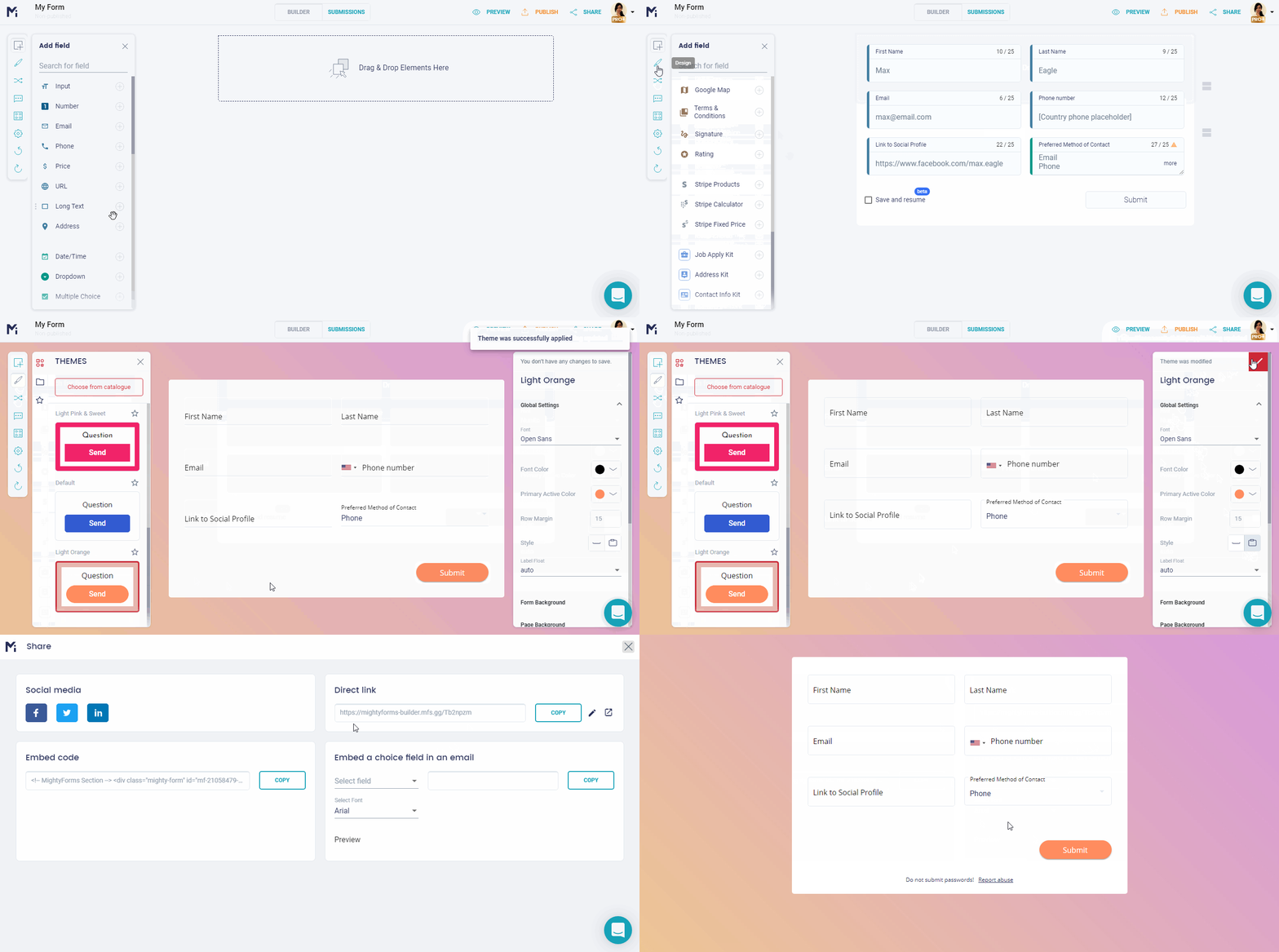
Start your contact form from scratch, then add and edit any field. Do you need a head start? Then select one from FormBuilder's ready-to-go templates, or describe the form to the AI form generator. You can even add your own branding for a stronger presence.
You can also be sure that all forms created by FormBuilder are SSL encrypted, so any data exchanged through your contact form is secured.
Once your contact form is ready and previewed (gotta make sure it’s mobile-friendly!), then it’s time to boost it. FormBuilder is packed with features and functionalities to automate your contact form.
Why You Should Automate Your Contact Form
Don’t just settle for collecting contact information when you can establish a successful client intake process. Automation enables your contact form to be promoted to a Customer Relationship Management tool.
If you were blown away by building your own contact form for your website with no coding required, wait until you see what else it can do.
Automation not only saves time, but it saves money too.
The operating costs for automatically qualifying and forwarding incoming leads are much lower than manual work. By automating time-consuming and repetitive admin tasks, you can better allocate your budget and your staff on strategic and creative projects. Like marketing campaigns or product design and development, for instance, that can only be done by humans.
Automation and the growing adoption of AI (Artificial Intelligence) are redefining businesses. And it is not replacing humans, but rather, freeing up time and resources to be employed in further professional and personal development.
For company owners, automation can roughly save your business $4 million annually, according to aForbes study. That’s just savings on manpower alone.
However, by automating processes, like a contact form, you get to not only reduce costs but to increase profit as well. A contact form on autopilot will improve lead generation, capture qualified leads, deliver better results, and provide pivotal insights to keep it running.
Automating your workflow helps to increase productivity and efficiency in order to outdo your competitors. It also eliminates the possibility of a human error. Even more important, it can warn you of any business-endangering issue.
The 24/7 reliability of an automated contact form will put your mind at ease, even on weekends. No lead will be processed later – it will be acknowledged in real-time.
Automatic notifications and integrations can also encourage smoother collaboration between departments, reducing miscommunication. And because everyone on board will follow established procedures, it will ensure compliance.
Managing your business through an automated workflow means you get to track and analyze metrics. You’ll be able to easily access accurate business data to help you with decision-making. Then, data-led insights can be easily shared and executed.
Do you now see the bigger picture by simply automating your contact form? Regardless of one or thousands of submissions, it will enable and empower business growth.
8 Ways to Leave Your Contact Form on Autopilot
According to the Cambridge dictionary, “on autopilot” means doing something without thinking about it or without making an effort.
When you consider the lifecycle of a lead, nearly every stage can be left on autopilot.
Processes, workflow, onboarding, incoming data, categorizing submissions, notifications, integrations, autoreply messages, redirecting viewers, qualifying leads, analytical data entry, and much more can all be automated.
Once your contact form is published, you should never think about it again. You should not have to keep logging in on your form builder to follow up on submissions. You should just reap the benefits and achieve the desired results effortlessly.
When you create your contact form with FormBuilder, you can program it to work for you. From the moment your respondent hits the submit button, you decide what happens next.
FormBuilder offers smart features and functionalities that you can easily set up in order to automate the lead capture submission workflow.
Here are the eight ways to leave your contact form on autopilot:
1. Logic Rules
No contact form is truly on autopilot without having conditional logic enabled. Also known as Logic Rules or Logic Jumps, conditional logic will act as your screening department. Create dynamic contact forms with conditional logic where the next question is only triggered according to previous answers. Your contact form will know which questions are relevant to each type of respondent.
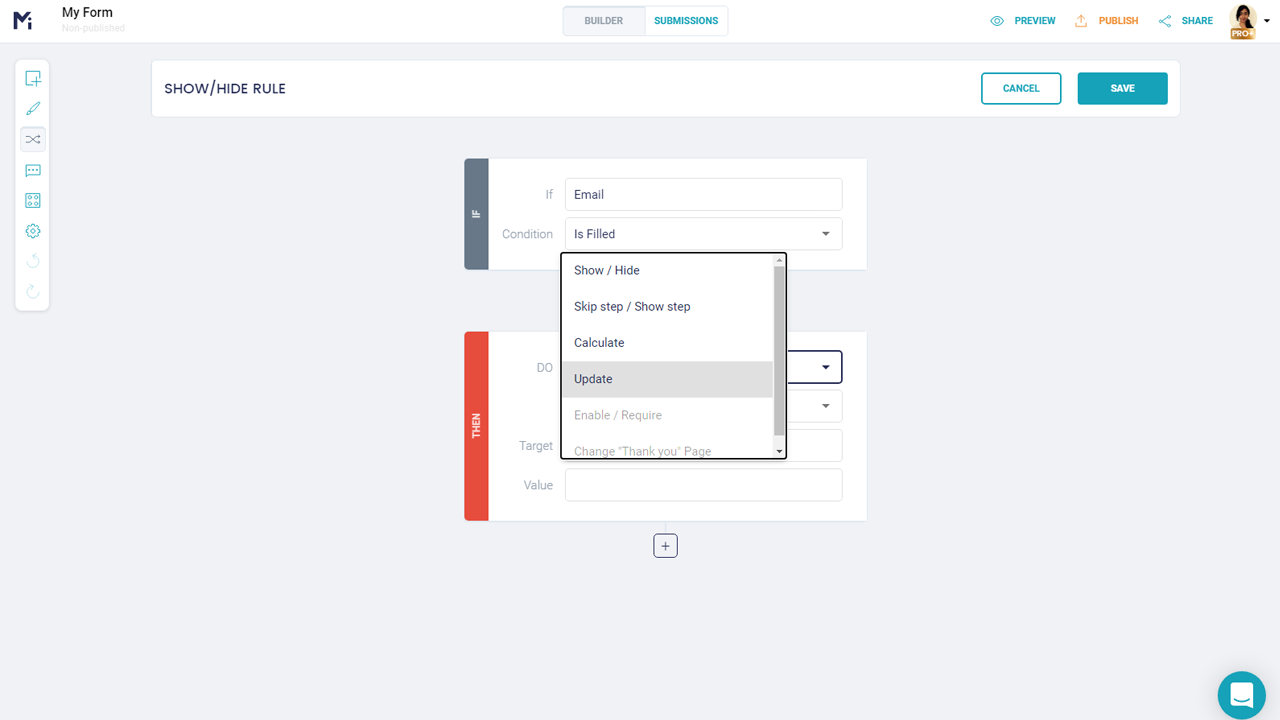
Besides creating a personalized and lean contact form, conditional logic can also simplify your onboarding process. Ask for the reason of contact first, then show only the follow-up questions that matter for it. For instance, if a respondent is reaching you about support, the form can ask for an order number; a sales request can ask about company size; a complaint can ask what went wrong, and so on and so forth.
2. reCAPTCHA
We all find annoying having to confirm we’re not robots when submitting a form, I know. But this tiny step before moving forward is essential to keep businesses safe. As a business owner, you want to take measures to protect yourself against “bots” attacks. But did you know that you can have that process automated as well? Call it “good bots fighting off bad bots”, but that’s what reCAPTCHA does.
FormBuilder offers built-in spam protection for all forms so your defense against spam and other malicious software can be left on autopilot. It tells humans from bots apart without adding friction for real people, so you block automated malware while welcoming real qualified leads.
3. Notifications
If automatically filtering and qualifying leads is already a huge help, then properly routing and forwarding them afterward just take it to the next level. A contact form on autopilot will notify the right people of its submission. Even if you just need to get a response rate in general, you’ll be notified automatically by email, without the need to login on FormBuilder.
The real hack is setting up notifications for the whole team, so every submission lands in the right inbox as it arrives. Notifications are enabled and personalized on your form’s Settings menu. Want to go further? Send each submission to Slack or your CRM through Zapier so the right team picks it up.
4. Success Page
Setting up notifications to alert you and your team of each new submission puts you ahead in the game. But setting up a thank-you page for the respondent enhances the customer experience. As soon as the submit button is hit, an automatic success message is shown to the respondent to let them know that their contact form was well received. Or to simply thank them for their business or welcome new members. You can also send an automatic confirmation email to the respondent, with a custom subject and message, so the reply lands in their inbox as well.
Even further, the success message can reassure respondents of the next steps. Don’t leave your respondents in suspense waiting for a confirmation. Your contact form on autopilot will take care of exchanging the first interaction with your audience. And you can make it dynamic too, by adding images or videos. Engage your leads, create a buzz, and impress them right off!
5. Multi-page Forms
Gone are the days when a long contact form scared people away. Split it into a multi-page form and put the essentials (name, email, reason of contact) on the first page, with the details on the pages that follow. Each step feels short, so more people finish, and combined with conditional logic each respondent only sees the pages that apply to them. And if someone can’t finish right away, no problem: answers save as they type, so they can come back later and pick up where they left off.
6. Scheduling & Access Controls
There are occasions where a form should only accept submissions for a while, or only from certain people. You can automate that too. FormBuilder's scheduling and access controls let your contact form open and close on a schedule, and password protection keeps a private form private.
Set a closing date for a campaign form and FormBuilder will stop accepting responses at that moment, no reminder in your calendar needed. And just like that, another time-consuming task is done for you.
7. Integrations
As I mentioned in the beginning, a contact form on autopilot is a self-managing one. After it has done all it could to automatically capture leads for you, it will help you with further data management. FormBuilder offers a native Google Sheets integration and connects to thousands of apps through Zapier to automatically sync all data gathered to other powerful tools and platforms. No need for manual and risky transfers.
If you want sustained growth, you need to convert leads into loyal customers. There are niche platforms like Mailchimp, HubSpot, Pipedrive and Dropbox that can help you develop client intake further, and Stripe payment fields if you need to take a payment right in the form. Or easily set up webhooks in order to automatically send data to any management software of your choice. You own your collected data, so it should be processed as you please.
8. Measurement & Analytics
A contact form on autopilot is such a devoted and faithful servant that it will not part with you without a memento. All artistic license aside, but what I really mean is that your contact form can provide you with metrics at the end. Every bit of data can be ROI analyzed for improvement.
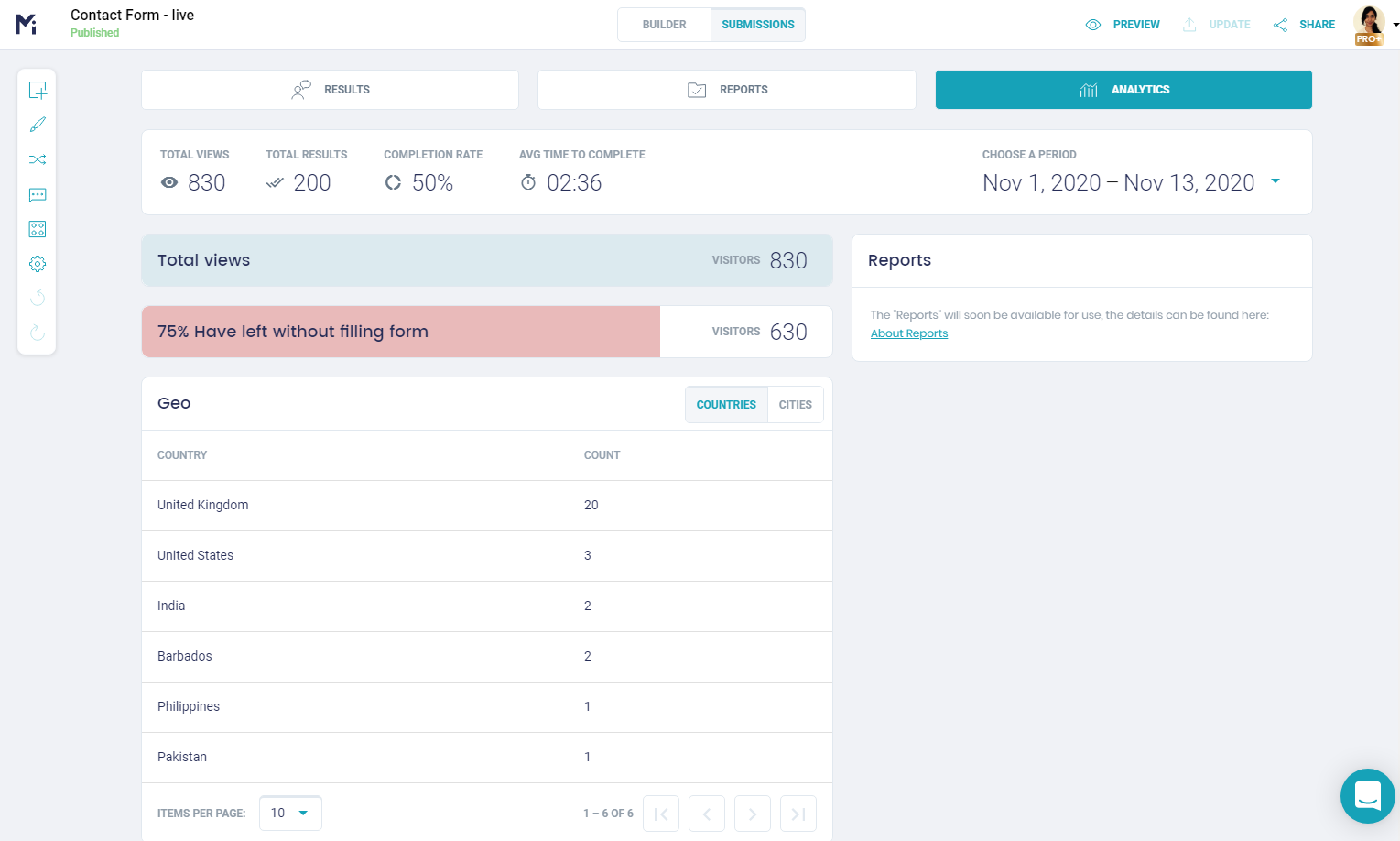
FormBuilder simplifies your data analytics and performance measurement with built-in form analytics (views, starts and completions) and by connecting your contact form to Google Sheets, so you can chart and slice your submissions to better drive your business decision-making and marketing campaigns.
And there you have it! We explored how you can automate every stage of a lead lifecycle for maximum results. Ensure consistency and reliability with every submission by easily setting up automation features and functionalities. Count on FormBuilder to act as a key player of your team with a powerful contact form on autopilot.